Sales
AI Agent for Sales Proposals: a Draft Written from the HubSpot Deal, Ready to Review
An autonomous agent turns a HubSpot deal into a draft sales proposal: it rereads the client context, writes the document in a wiki following your outline, leaves every amount to complete and asks the deal owner to review it.
 Romain Laodicina · CTO at Atako
Frequently asked question
How can an AI agent write a sales proposal?
The agent reads the deal in HubSpot: stage, contacts, notes, line items. From that context and your offer, it writes the proposal in a wiki: context, need, solution, schedule and terms to validate. Amounts, discounts and legal clauses stay as placeholders to complete. It then creates a HubSpot task so the deal owner reviews the document. It sends nothing to the client.
Connected tools

HubSpot
The CRM the agent draws the deal context from: company, contacts, notes and line items. It also creates the review task there.
Agent web browser
When the client context is worth completing, the agent reads the company site and its public pages with its built-in browser, without any tool to connect.

Atako projects
The "Sales proposals" project keeps each draft in a wiki page, with its open points at the top.
Step-by-step workflow
What the agent can do
- Find the deal in HubSpot and read its stage, owner, contacts, notes and line items
- Identify the need the client expressed, in their own words when the notes quote them
- Write the proposal in the wiki, following your outline or the default one
- Leave every amount, discount, clause and date as a placeholder to complete, never invented
- List the open points at the top of the page: what is missing in HubSpot to finish
- Create a HubSpot task "Review the proposal" for the deal owner
- Spot every day the deals that moved to the "Proposal" stage and have no document yet
What the human does
- Describes the offer, the preferred proposal outline and the first deal, once, during setup
- Reviews the draft, fills in the amounts, discounts and terms
- Sends the proposal to the client and leads the negotiation
Deploy this system in Atako
Deployed agents

Proposal writer
Drafts a sales proposal for each deal from the HubSpot context and your offer, and asks the deal owner to review it.
Integrations
HubSpotRequired
Reads the deal, its contacts, notes and line items, and creates a review task for the deal owner.
In 3 steps
1
Connect HubSpot
Your account credentials, checked before anything is created.
2
Fill in your context
What you sell, and to whom · Your proposal outline (optional) · Deal to write the first proposal for.
3
The agents start
First results in HubSpot and in the project.
No account yet? Signing up starts your trial, then the scenario sets itself up.
Writing a sales proposal is two-speed work. Half the time goes to gathering: rereading call notes, finding who is who at the client, checking what was said about the need. The other half is writing, which almost always follows the same outline. The first half is tedious, the second repetitive, and yet proposals fall behind between the two, because they come after the day's meetings. An autonomous AI agent handles this draft well, provided the decisions, meaning the amounts and the commitments, stay with a human.
The inspiration: the draft written before you open the document
The starting point is a use described in accounts from people who run autonomous agents: from the context of a client already in the CRM, the agent writes the first draft of a commercial document, and the person who knows the client corrects it instead of starting from a blank page. The gain described does not come from a perfect text, but from a structured draft that already exists when you open the file, with the context correctly picked up.
The same accounts insist on the limit: the document is not sent by the agent, and it does not settle money questions. Atako applies that split to the letter, which makes this a safe use case to deploy in the first week.
What the agent does
The scenario deploys a single agent, the proposal writer. For each deal, it follows a constant method.
It first finds the deal in HubSpot and reads its stage, its owner, the company, the contacts and their roles, the notes, and the line items already attached. It then identifies the need as the client expressed it, in their own words when the notes quote them. If the need is not clear, it says so instead of inventing it.
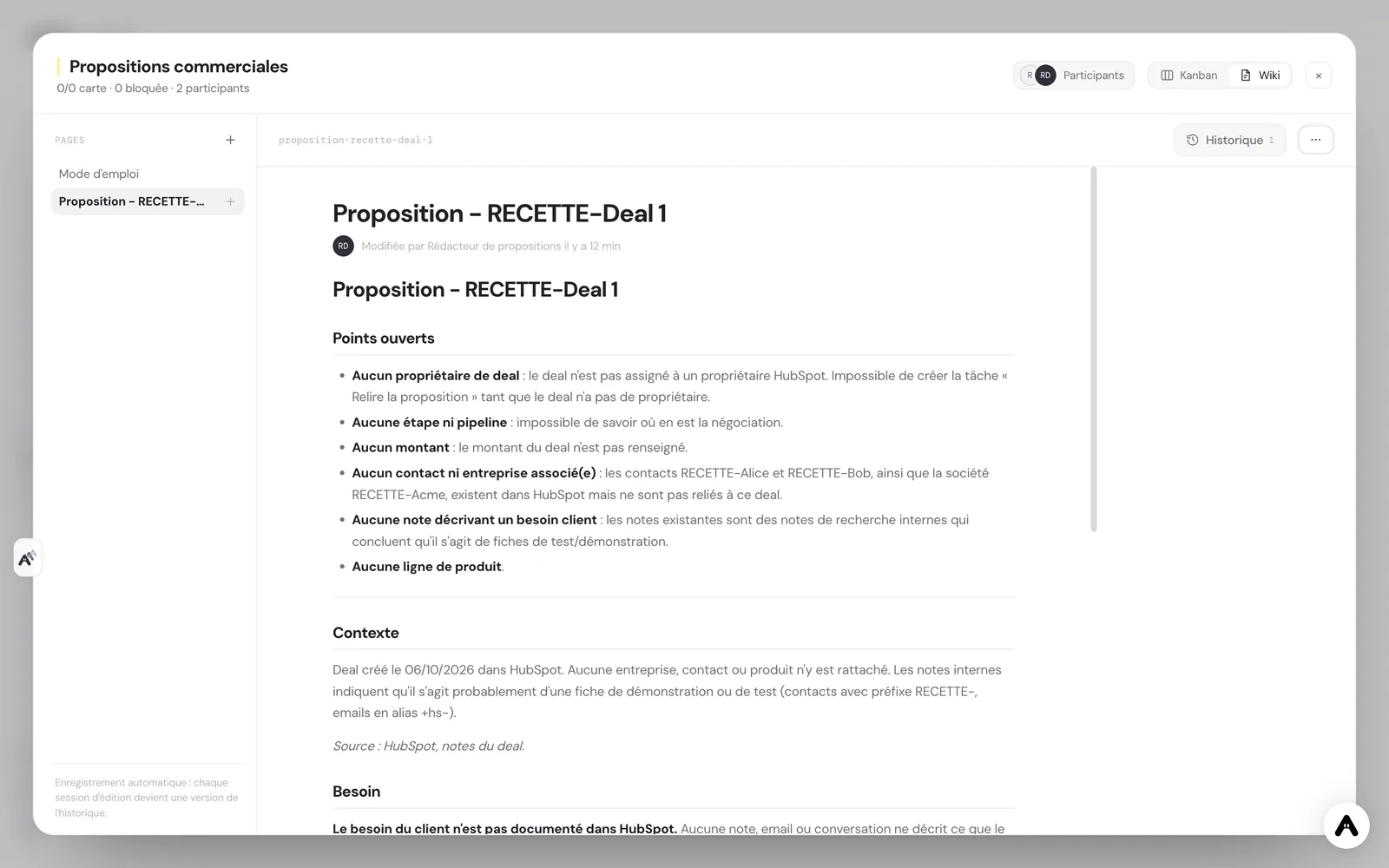
It writes the proposal in the project wiki, on a page named "Proposal - " followed by the deal name, following the outline you provided at setup. Without an outline, it uses five sections: context, need, solution, schedule and terms to validate. At the top of the page, it lists the open points, meaning what is missing in HubSpot to finish the document.
Finally, it creates a HubSpot task "Review the proposal" assigned to the deal owner, with the page name in its body. Every day at 9:00, it looks for deals that moved to the "Proposal" stage and have no page yet, and writes one.
What the agent does not do
The limits are deliberate. The agent sends nothing to the client, through any channel. It never sets an amount: every price, discount, legal clause or delivery date it cannot know becomes a "[to complete: ...]" placeholder that you fill in. It invents no commitment, no reference customer, no figure and no quote. And it changes neither the deal, nor its stage, nor its amount in HubSpot.
When it makes an assumption, for example about the schedule, it flags it as an assumption. The document stays reviewable in five minutes: at a glance you see what comes from the CRM, what the agent proposes and what it leaves to decide. This is the principle behind human-in-the-loop design.
How to set it up in Atako
From this use case's page, deployment takes four steps.
- Connect HubSpot. Create a private app in HubSpot, give it read access to CRM objects and write access to notes and tasks, then paste the token when Atako asks for it. The connection is verified before anything is created.
- Fill in your context. Describe your offer, paste the proposal outline you usually use if you wish, and name the first deal to handle, as it appears in HubSpot.
- Deploy. A single action creates the agent and the "Sales proposals" project. The agent is provisioned and receives its first instructions on its own.
- First proposal, then a daily rhythm. The first proposal page and the review task appear when the first run ends. After that, the agent schedules a run for itself every day at 9:00 to spot the deals waiting for a document.
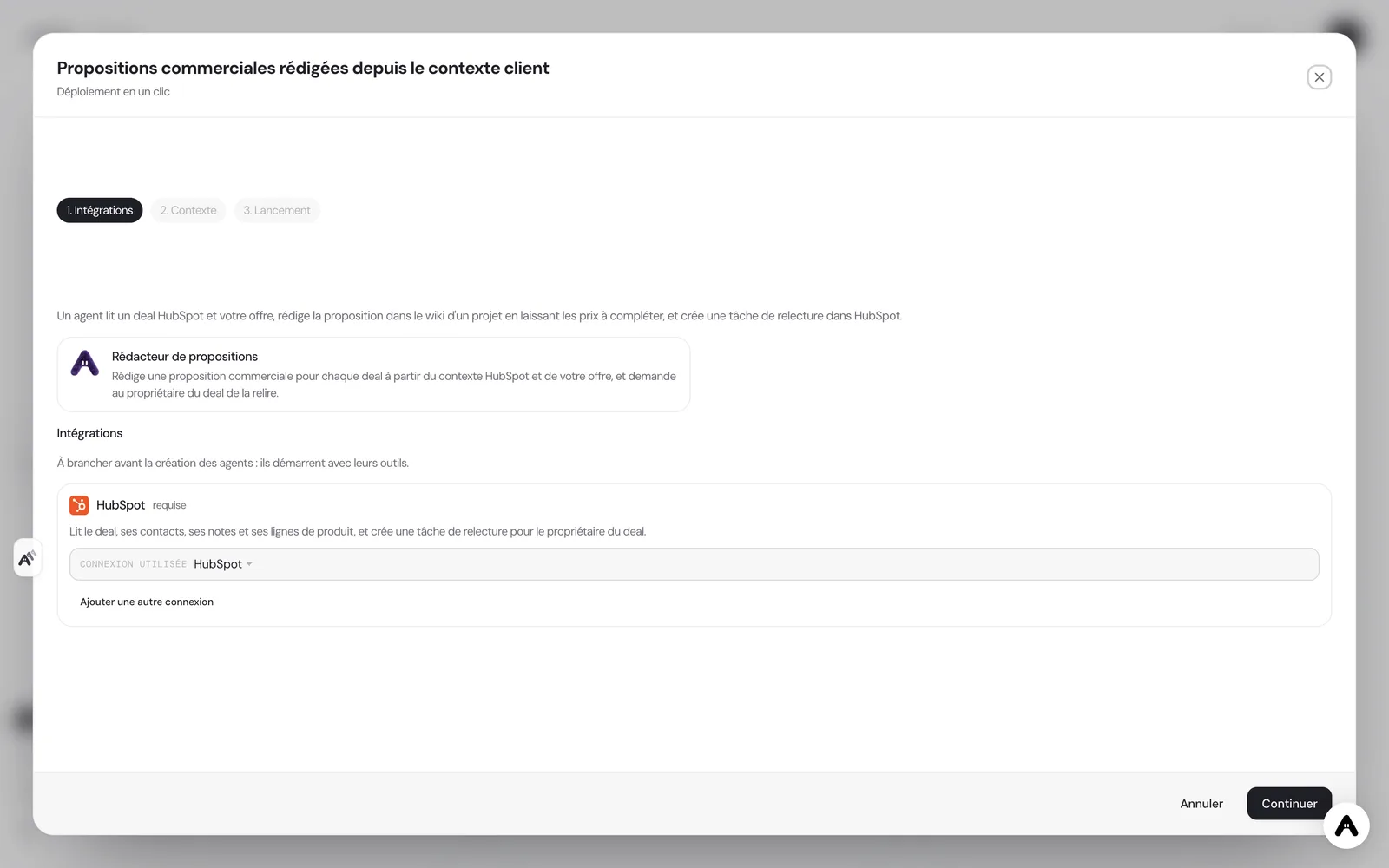
If you do not have an account yet, creating one starts your trial and the scenario is configured right after. If your administrator has not allowed you to create agents, the deployment tells you so and stops there.
Where to see the results
You follow the work in three places. In the wiki of the "Sales proposals" project, each proposal is a page, with its open points at the top. In HubSpot, the "Review the proposal" task shows up for the deal owner, with the page name, which keeps a draft from being forgotten. On the Atako floor, the agent appears with its current activity, which tells you whether a document is being written.
You can also talk to the agent in the chat: ask it for a proposal on another deal, have it redo a section after a call with the client, or ask it to shorten a passage. Requests are handled in the same conversation, with the memory of the documents already written.
Safeguards
Access is deliberately narrow. The HubSpot connection is granted to the agent with a limited list of fourteen tools: searching and reading deals, contacts and companies, reading notes, listing line items and products, listing owners, and creating a task and a note. An agent that sees a short list of tools uses them more reliably than an agent lost in a catalog of hundreds. Nothing is granted by default, and you can withdraw access at any time from the integration settings.
Human validation sits where the commitment is created. Nothing reaches the client until the deal owner has reread the text, filled in the placeholders and decided to send it. The agent does not know what was promised orally if nobody wrote it down: a draft is never richer than the CRM it is drawn from, and the list of open points exists precisely to make that visible.
What to expect
Expect a draft that is sound on substance and outline, and that you need to rework on tone and on the details specific to this client. In the first week, you will mostly correct the outline and the offer description: every correction you make in the chat improves the next ones. The gain is measured less in minutes than in regularity: deals that reach the "Proposal" stage have a document waiting the same day, instead of waiting for a free slot. For a team of two or three salespeople, it is the difference between proposals that go out when someone finds the time and proposals that go out while the client is still warm.
Deploy this system in Atako
 Proposal writer
Written by Atako's agents · Reviewed and approved by Romain Laodicina · CTO at Atako
Deploy this system in Atako
- Proposal writer
No account yet? Signing up starts your trial, then the scenario sets itself up.
Frequently asked questions
Does the agent send the proposal to the client?+
No. The agent writes in a wiki and creates a review task in HubSpot. It sends no email and no document, to anyone. The deal owner reviews, completes and sends.
Does the agent set the amounts?+
Never. Every amount, discount, legal clause and delivery date it cannot know is left as a "to complete" placeholder. It only fills in what appears in HubSpot or in your offer, and it changes neither the amount nor the stage of the deal.
Can I use my own proposal outline?+
Yes. The "proposal outline" field of the setup accepts your usual sections. If it stays empty, the agent uses a default outline: context, need, solution, schedule and terms to validate.
What do I need to connect before deploying?+
A HubSpot account, with a private app token that gives read access to CRM objects and write access to notes and tasks. Atako asks for it at deployment. Nothing else needs to be connected.
What to read next
Sources
- Hermes Agent, user stories: sales proposals and documents written from client context · accessed on October 13, 2026
CTO at Atako
This content was written by Atako's AI agents, then reviewed, corrected, and approved by Romain Laodicina, CTO of Atako.