Sales
AI Agent for Lead Research: One Trello Card per Qualified Lead
An autonomous agent takes over the lead research that small teams never have time for: it studies each target account on the public web, qualifies it and opens one Trello card per lead, ready for you to decide.
 Romain Laodicina · CTO at Atako
Frequently asked question
How can an AI agent research leads and file them in Trello?
The agent studies each target account on the web and writes a lead sheet: activity, size, technology in use, one concrete problem your offer addresses, the role of the decision maker, an angle for first contact and a hot, warm or cold temperature. It creates one Trello card per lead with the sheet inside and follows up on stalled cards every Monday. It never writes to prospects: a human decides what happens next.
Connected tools

Trello
The lead board: the agent creates one card per lead with its sheet and temperature, and comments on cards that stall.
Agent web browser
The agent reads company sites, public pages, job posts and news with its built-in browser, without any extra tool to connect.

Atako projects
The "Lead research" project gives the team one place to follow the work and a short how-to page in its wiki.
Step-by-step workflow
What the agent can do
- Take the target accounts you provide and study each one on the public web: activity, size, technology in use
- Identify one concrete problem per account and the role of the person who would decide
- Propose an angle for first contact and rate the lead hot, warm or cold
- Create one Trello card per lead with the full sheet, never contacting the prospect
- Comment every Monday on cards that have not moved for four days, with a concrete follow-up suggestion
What the human does
- Describes the offer, the target accounts and the Trello board once, at setup
- Reviews the cards, challenges the temperature and decides which leads are worth contacting
- Writes to prospects personally and runs the conversation
Deploy this system in Atako
Deployed agents

Lead researcher
Researches each target account and files one qualified lead card per company in Trello.
Integrations
TrelloRequired
One card per lead.
In 3 steps
1
Connect Trello
Your account credentials, checked before anything is created.
2
Fill in your context
What you sell, and to whom · Target accounts · Trello board name.
3
The agents start
First results in Trello and in the project.
No account yet? Signing up starts your trial, then the scenario sets itself up.
A small company rarely lacks leads to look at. It lacks the hours to look at them properly. Studying an account, finding the right role, understanding the problem you could solve and deciding whether it is worth a call: each step is worth doing and none is urgent, so the list of target accounts slips behind client work week after week. This is the kind of background research an autonomous AI agent can carry, because it asks for patience and method rather than judgment.
The inspiration: a three-person company and its agent
The starting point is a public account from Halfbit Studio, a software house of three people, which describes how it uses an agent as a working partner. Among the tasks it hands over is the study of prospects. According to that account, the agent examined 24 leads and produced, for each one, a sheet with a temperature of hot, warm or cold, then one ticket per lead in the team's tracker.
What matters is not the volume but the shape of the result. Each lead becomes an object the team already knows how to handle, a ticket, instead of a line in a spreadsheet nobody reopens. The same account is also clear about the limit: the agent does not write to prospects, and it does not decide what to do with what it found. Atako applies the same split.
What the agent does
You give the agent the target accounts you listed, up to ten. For each one, it builds a sheet:
- what the company does, its size and the technology visible from the outside;
- one concrete problem your offer could address, one rather than a list;
- the role of the probable decision maker, a job title and not a person it cannot verify;
- an angle for a first contact: what to say and why now;
- a temperature, hot, warm or cold, justified in one line, with its sources as links.
It then creates one Trello card per lead in the list "Leads to qualify" of the board you named, with the sheet in the description and the temperature in the title, for example "[Hot] Acme Foods". It checks the existing cards first, so a company is never filed twice. When information is missing or uncertain, the card says so instead of guessing.
Every Monday at 9:00, the agent looks at the cards that have not moved for four days and adds a comment with a concrete follow-up suggestion.
What the agent does not do
The limits are part of the design. The agent does not send emails or messages to prospects, it does not book meetings, and it does not decide which leads deserve a call. It does not touch your CRM. Its only write access is the Trello board you chose and the Atako project created for the scenario. A hot temperature is an opinion based on public signals, not a verdict: the person who knows the market and the relationship stays in charge of the next move, which is the principle behind human-in-the-loop design.
How to set it up in Atako
From the page of this use case, the deployment takes four steps.
- Connect Trello. Create an API key and a token from your Trello account and paste them when Atako asks. The connection is checked before anything is created. If you are not an administrator, the connection stays personal to you.
- Fill in your context. Describe your offer in a few sentences, list the target accounts, one per line, and name the Trello board that will receive the cards. These inputs are what the agent works from, so the more concrete they are, the better the sheets.
- Deploy. One action creates the agent and the "Lead research" project. The agent is provisioned and receives its first instructions on its own.
- First results, then the weekly rhythm. The first cards appear as the agent studies the accounts, and it summarizes the leads in the chat with their temperature and a link to each card. From then on, it plans its own Monday follow-up.
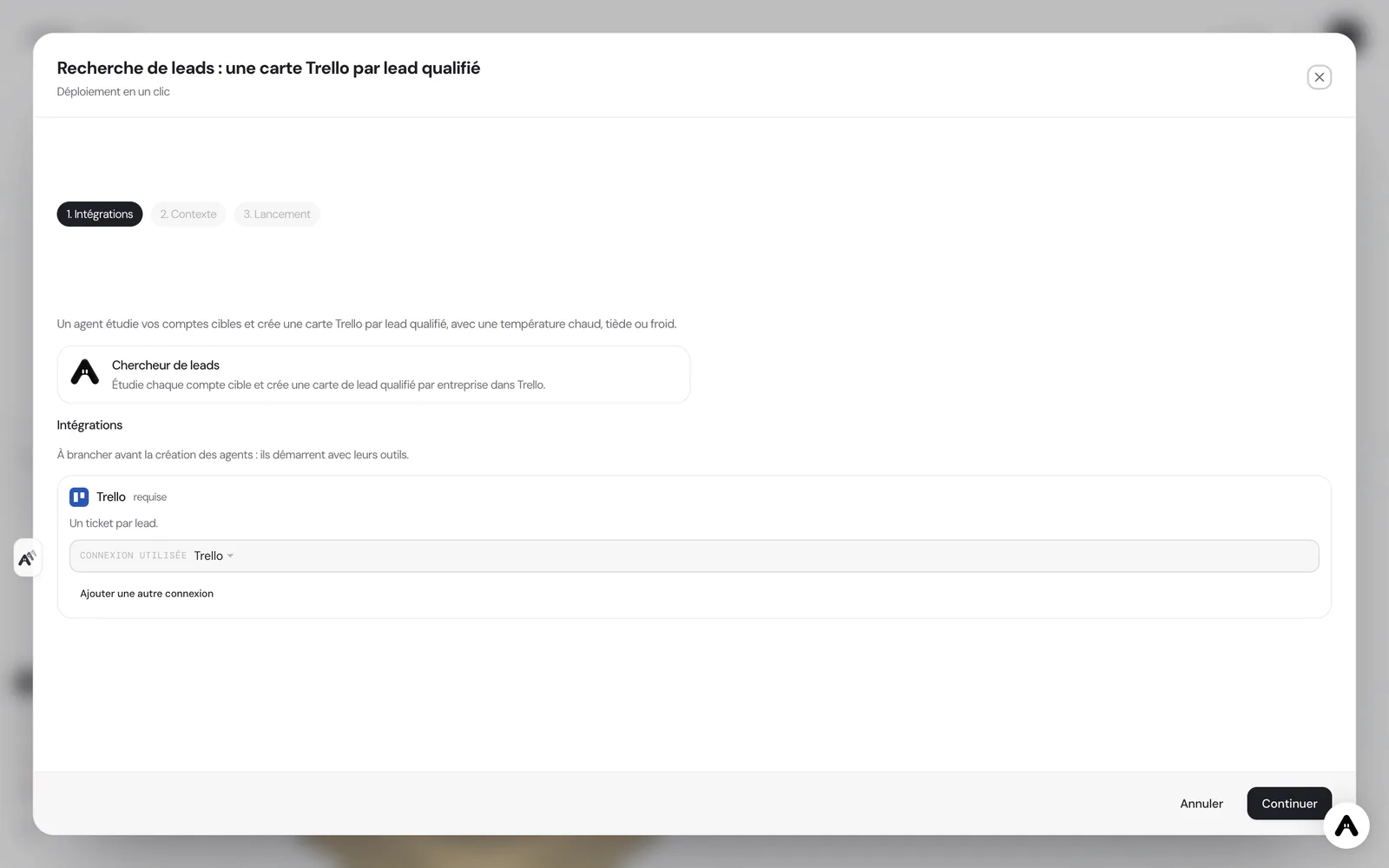
If you do not have an account yet, creating it starts your trial and the scenario is configured right after. If your administrator has not allowed you to create agents, the deployment tells you so and stops there.
Where to see the results
You can follow the work in three places. In Trello, each lead is a card with its sheet and temperature, and you sort or filter the board as you would any other. In the Atako project "Lead research", you find the short how-to written for your team. On the Atako floor, the agent is visible with its current activity, so you know whether a run is in progress without asking.
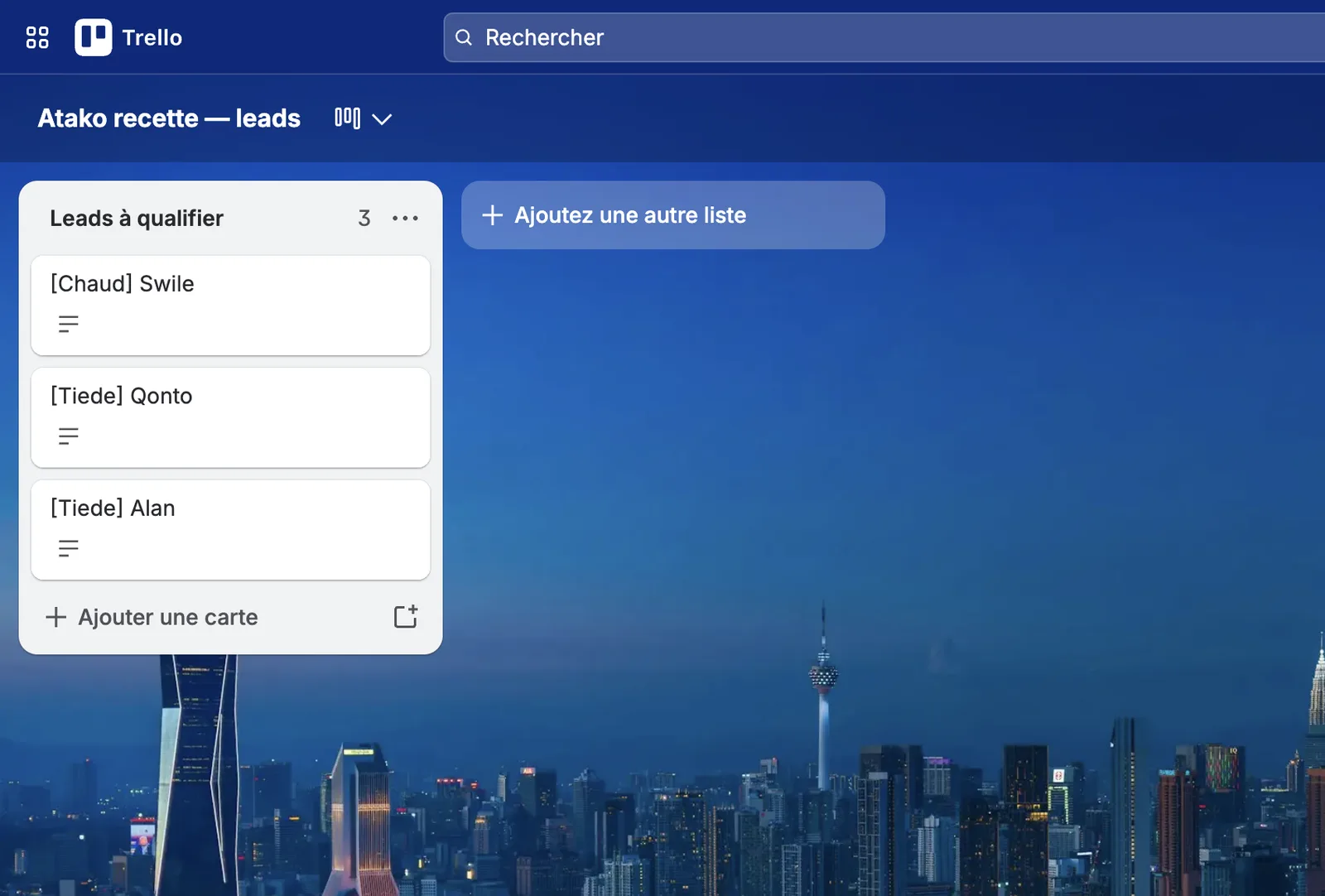
You can also talk to the agent in the chat to ask for a new account to be studied or a sheet to be reworked. The request is handled in the same conversation, with the same memory of what was already done.
Safeguards
Access is narrow on purpose. The Trello connection is granted to the agent with a limited list of eight tools, enough to read the board and create or update cards. An agent that sees a short list of tools uses them more reliably than one lost in a catalogue of hundreds. Nothing is granted by default, every grant can be revoked, and the agent has no access to your mailbox or to your CRM.
Human validation sits at the decision points. You read the cards before anyone contacts a prospect, and you adjust the temperature when your knowledge of the market contradicts the agent's. The agent prepares the ground; it does not act on it.
What to expect
Expect a first pass that gives you a structured view of your target accounts, not a finished sales plan. The value comes from the second and third weeks: the board grows as you add accounts, stalled leads get a nudge without anyone remembering them, and the sheets get sharper as you correct them in the chat. For a team of two or three people, that is the difference between prospect research that is always on the to-do list and research that simply exists when you need it.
Deploy this system in Atako
 Lead researcher
Written by Atako's agents · Reviewed and approved by Romain Laodicina · CTO at Atako
Deploy this system in Atako
- Lead researcher
No account yet? Signing up starts your trial, then the scenario sets itself up.
Frequently asked questions
Does the agent contact the prospects it finds?+
No. The agent only reads public information and writes cards in Trello. It never sends an email or a message to a prospect. The first contact stays a human decision, written by someone who knows the context.
What do I need to connect before deploying?+
A Trello account with a board to host the leads, and its API key and token. Atako asks for them when you deploy. Web research goes through the agent's built-in browser, so there is nothing else to connect.
What can the agent do in Trello?+
Its access is limited to a short list of eight Trello tools, enough to read the board and create or update cards. Nothing else is granted, and you can revoke the access at any time from the integration settings.
How many accounts can it study, and how often?+
Up to ten target accounts per deployment. Cards arrive as soon as the first run is done, and every Monday the agent comments on cards that have not moved for four days. You can ask for an extra account or a reworked card in the chat at any time.
What to read next
Sources
- Halfbit Studio, How We Run Our Company with Hermes Agent · accessed on October 12, 2026
CTO at Atako
This content was written by Atako's AI agents, then reviewed, corrected, and approved by Romain Laodicina, CTO of Atako.