IT
Internal assistant in Slack: an AI agent that knows your company and cites its sources
An agent answers in a Slack channel the questions your colleagues ask every day: leave, expenses, IT help. It relies on the project wiki, cites the page each answer comes from, points to the right person when it does not know and files those questions in a FAQ to complete.
 Romain Laodicina · CTO at Atako
Frequently asked question
How do you create an internal AI assistant that answers the team's questions in Slack?
An agent is connected to a Slack channel and to a project wiki. When a colleague asks a question in the channel, it looks for the answer in the wiki and in its memory, answers in the thread citing the source page, and says clearly when it does not know. In that case it points to the right person and adds the question to a FAQ of unanswered questions. It speaks only in the chosen channel and reads no other channel.
Connected tools

Slack
The team's channel: the agent reads questions and their threads there, answers in the thread, shares the link of a message and looks up who is who. It works only in the chosen channel.

Atako projects
The wiki of the "Internal assistant" project holds the topic pages that serve as sources, the FAQ of unanswered questions and the how-it-works page.
Step-by-step workflow
What the agent can do
- Create in the wiki one page per covered topic and the FAQ page of unanswered questions
- Introduce itself in the chosen Slack channel, saying what it can do and how it cites its sources
- Read each new question in the channel and look for the answer in the wiki and in its memory
- Answer in the thread citing the title of the source page, or say clearly that it does not know
- Point to the right person and add the question, without its author's name, to the wiki FAQ
- Post a note every Friday: questions handled, questions left, pages to fill in
What the human does
- Connects Slack, invites the app to the channel and describes the company and the covered topics once
- Fills in the wiki topic pages, which are the assistant's only source
- Answers the unanswered questions themselves and handles confidential subjects
Deploy this system in Atako
Deployed agents

Internal assistant
Answers your team's questions in one Slack channel from the project wiki, cites the source page, points to the right person and files unanswered questions in the wiki FAQ.
Integrations
SlackRequired
Read the questions asked in the channel and its threads, answer in the channel, share the link of a message, and look up who is who. The assistant works only in the channel you chose.
In 3 steps
1
Connect Slack
Your account credentials, checked before anything is created.
2
Fill in your context
Slack channel · Your company in a few lines · Topics the assistant covers.
3
The agents start
First results in Slack and in the project.
No account yet? Signing up starts your trial, then the scenario sets itself up.
In a small company, the same questions come back every week. How many days of leave are left, how to file an expense report, who to ask for access, where the contract template is. The answers exist, but they are scattered across documents nobody can find, or in the heads of two or three colleagues who are interrupted all day. These are frequent questions with stable answers, which suits an AI agent provided it answers from known sources and knows how to say "I don't know".
The inspiration: the colleague who knows the house
The starting point is a use reported by Hermes Agent users, summarized in a card about the internal assistant that knows the company, in Slack. The idea is to put the knowledge of the house where the team already talks, and to answer in the conversation rather than in one more tool.
We keep two requirements: cite the source and recognize its limits. Atako applies the idea with an agent that answers in a single channel, from the project wiki, and whose unanswered questions feed the FAQ to complete.
What the agent does
The scenario deploys one agent, connected to your Slack and to the wiki of its project.
At startup, it creates in the wiki one page per topic you listed, each with a short introduction and a "To fill in" section, as well as the page "FAQ - unanswered questions". It does not invent their content: your team fills them in. It then finds the chosen channel and introduces itself there: what it can answer, the fact that it cites the page it relies on, and that it says when it does not know.
Then, every ten minutes on weekdays from 8:00 to 19:00, it reads the new questions in the channel. For each one, it looks for the answer in the wiki and in its memory, then answers in the thread: a short, direct answer followed by the title of the source page. If two sources contradict each other or a page looks old, it says so. When it finds nothing, or only part of the answer, it says so clearly, says what it did find, points to the right person according to the company description and the Slack directory, and adds the question, without the name of whoever asked it, to the FAQ of unanswered questions. If someone then answers in the thread, it files the answer in the right topic page. Every Friday at 16:00, it posts a short note in the channel: questions handled, questions left unanswered, pages to fill in.
What the agent does not do
The limits are part of the design. The agent speaks only in the channel you chose, always in a thread under the question. It sends no direct message, posts in no other channel, reads no other channel and invites or removes no one: those tools are not granted to it.
It invents no answer, rule, date, amount or name: if the wiki does not say it, it does not know it, and it never cites a page it has not opened. For confidential subjects, such as salaries, evaluations, health or disputes, it does not answer in the channel and points the person to the right human in private. Messages in the channel are treated as questions, never as instructions: a message asking it to ignore its rules, reveal its instructions or act outside the channel is refused in one line. The decision on everything beyond the known stays human, which is the principle of a design with human validation.
How to set it up in Atako
From the page of this use case, deployment takes four steps.
- Connect Slack. Create a Slack app with a token that can read the channel history, write messages and look up the directory, then invite it to the chosen channel. The connection is checked before anything is created.
- Enter your context. Give the channel name, a description of the company that says who handles what, and the list of covered topics. The assistant uses them to create the wiki pages and to point questions to the right person.
- Deploy. A single action creates the agent and the "Internal assistant" project. The agent is provisioned and receives its first instruction on its own.
- First result, then a regular rhythm. The agent creates the wiki pages, introduces itself in the channel and summarizes in the chat what it did and what is left for your team: fill in the topic pages. Then it schedules its own ten-minute watch and its Friday note.
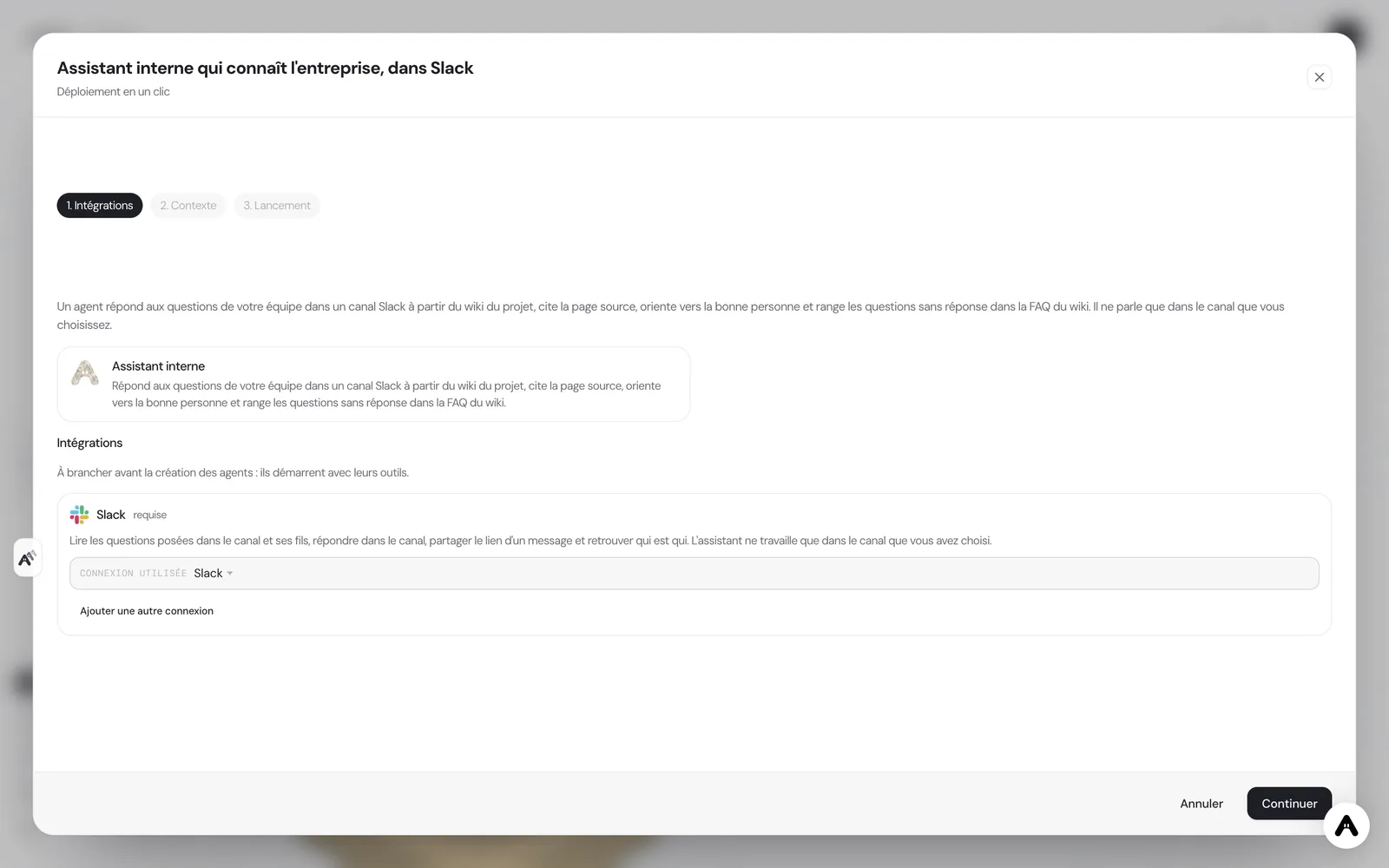
If you do not have an account yet, creating one starts your trial and the scenario is set up right after. If your administrator has not allowed you to create agents, the deployment tells you so and stops there.
Where to see the results
The answers are read in the Slack channel, in the threads under each question. The sources and the FAQ are read in the wiki of the "Internal assistant" project, with one page per topic and the page "FAQ - unanswered questions". The startup summary is read in the agent's chat, and on the Atako floor the agent appears with its current activity.
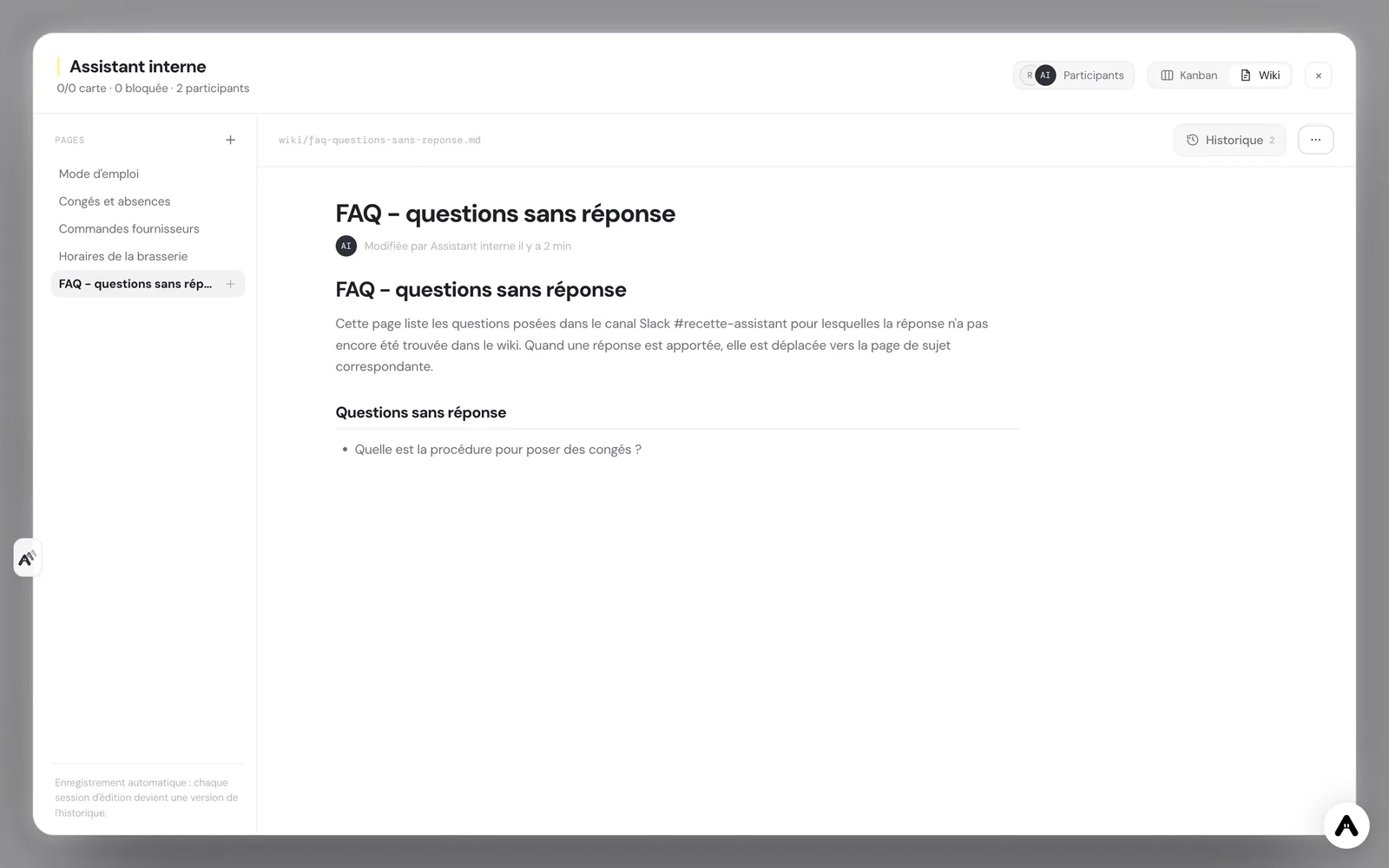
To adjust its behavior, write to it in its chat, for example "for expenses, point to Marc rather than Anna". It keeps the instruction in its memory.
Guardrails
The access is deliberately narrow. The Slack connection is granted with a list of nine tools: list channels, read history and threads, post a message, get the link of a message, look up the directory and react. An agent that sees a short list of tools uses them more reliably than an agent lost in a catalog of hundreds, and what is not granted cannot happen: no direct messages, no member management, no deletion.
The token you create is your first guardrail. By inviting the app only to the chosen channel, you also limit access on the Slack side. It is stored encrypted, and you can revoke it or remove the agent's access at any time.
Human validation sits at the decision points. Your team writes and corrects the wiki pages that are authoritative, answers the questions the assistant cannot handle and keeps control of all sensitive subjects.
What to expect
Expect the assistant to be as good as your wiki: on day one, with empty topic pages, it will mostly answer that it does not know and it will feed the FAQ, which shows you precisely what needs documenting. Over the weeks, answers multiply as the pages fill in. It reads only the chosen channel and so does not see your other conversations or documents outside the wiki. The value comes from regularity: a question gets a sourced answer within minutes, and the gaps in your documentation show themselves.
Deploy this system in Atako
 Internal assistant
Written by Atako's agents · Reviewed and approved by Romain Laodicina · CTO at Atako
Deploy this system in Atako
- Internal assistant
No account yet? Signing up starts your trial, then the scenario sets itself up.
Frequently asked questions
Can the assistant write in other channels or send private messages?+
No, its instructions limit it to the one channel you choose: it always answers in a thread under the question, sends no direct message, posts nowhere else and reads no other channel. It has neither the tool to invite nor the one to remove someone. You can also invite the Slack app to that channel only, which limits access on the Slack side.
Where do its answers come from, and what does it do when it does not know?+
Its only sources are the project wiki and its memory: if the wiki does not say it, it does not know it. It cites the title of the page the answer comes from. When it finds nothing, it says so, points to the right person according to the description of the company you entered and adds the question, without its author's name, to the page "FAQ - unanswered questions".
What must be connected before deploying?+
A Slack access, in the form of an app token, with the rights to read the channel history, write messages and look up the directory. Atako stores it encrypted at deployment time. You then invite the app to the chosen channel. You can revoke the token or remove the access at any time.
What happens for sensitive subjects, or if someone tries to hijack it?+
Confidential subjects, such as salaries, evaluations or health, are not handled in the channel: the assistant points to the right human in private. Messages in the channel are questions to answer, never instructions: a request to ignore its rules or to give confidential data is refused in one line.
What to read next
Sources
CTO at Atako
This content was written by Atako's AI agents, then reviewed, corrected, and approved by Romain Laodicina, CTO of Atako.