Finance
AI Billing Agent: Invoice Drafts from Clockify, Validated by You
An autonomous agent turns the hours tracked in Clockify into invoice drafts: it groups by client and project, applies your rates, flags the gaps, then asks you to validate. You are the one who sends the invoice.
 Romain Laodicina · CTO at Atako
Frequently asked question
How can an AI agent prepare invoices from time tracking?
The agent reads the Clockify time entries of the workspace you name, groups them by client, project and task, then applies your rates and billing terms. It lists the gaps first: time without a project, running entries, budgets exceeded, missing rates. It writes an invoice draft and a client recap in a wiki, then asks you a blocking validation question. It never sends an invoice or a message: a human validates and sends.
Connected tools
Clockify
The time-tracking tool the agent draws hours from, by client, project and user. Access is read only: the agent creates and changes no entry.

Atako projects
The "Invoice drafts" project keeps each draft and its client recap in a wiki page, in one place for the whole team.
Step-by-step workflow
What the agent can do
- Read the month's time entries for every user of the Clockify workspace you named
- Group hours by client, project and task, and apply your rates and terms
- List the gaps: time without a project, running entries, budgets exceeded, missing rates
- Write an invoice draft and a client recap per client in the wiki
- Ask one grouped validation question and wait for the answer
- Start over on the last working day of each month
What the human does
- Describes the Clockify workspace and the billing rates once, during setup
- Answers the validation question: approve, correct or hold each draft
- Sends the invoice to the client from their own invoicing tool
Deploy this system in Atako
Deployed agents

Billing preparer
Turns the hours tracked in Clockify into invoice drafts and client recaps, then asks you to validate.
Integrations

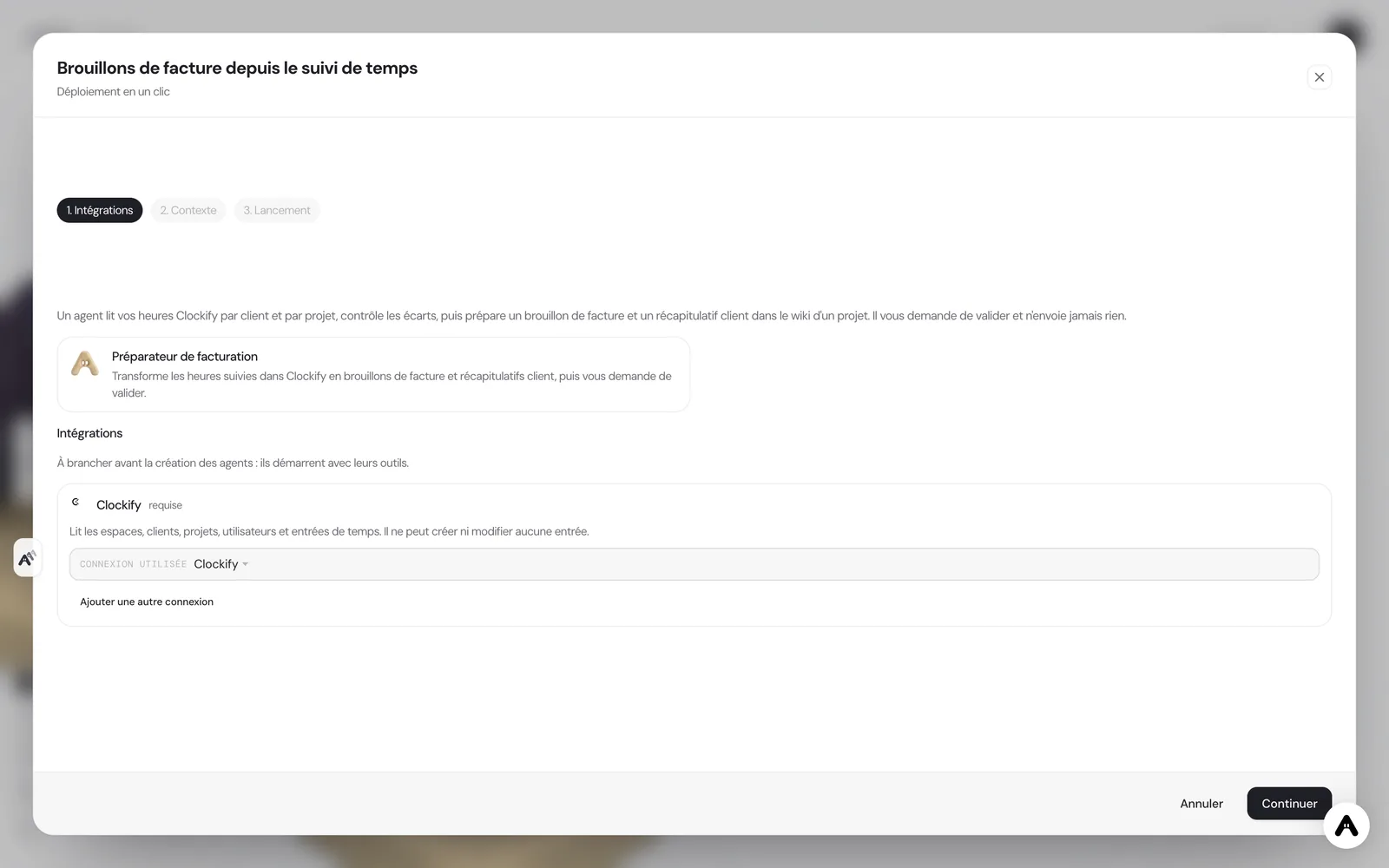
ClockifyRequired
Reads workspaces, clients, projects, users and time entries. It cannot create or change any entry.
In 3 steps
1
Connect Clockify
Your account credentials, checked before anything is created.
2
Fill in your context
Clockify workspace · Hourly rates and billing terms · Budgets and special cases (optional).
3
The agents start
First results in Clockify and in the project.
No account yet? Signing up starts your trial, then the scenario sets itself up.
Billing from time spent looks simple until the end of the month. You have to find everyone's hours, attach them to the right client, apply the right rate, spot forgotten entries or time without a project, and check that the promised budget is not exceeded. The work is repetitive, error-prone and postponed to the last minute. It is a good fit for an autonomous AI agent: reading, arithmetic and method, with a human validation before anything goes out.
The inspiration: a draft ready, a human decision
User stories of autonomous agents describe a simple use: the agent reads the time tracking, prepares the invoice and stops before sending. The gain is not billing without looking, it is no longer starting from a blank page. Atako keeps that split: the agent prepares and flags, the human decides and sends.
What the agent does
The scenario deploys a single agent, the billing preparer. It starts by finding the workspace you named in Clockify, then lists the clients, projects and users and reads each person's time entries.
It groups hours by client, then project, then task, and applies your rates and terms. Before writing, it lists the gaps: entries without a project or description, entries left running or over twelve hours, projects above the budget you gave, hours with a non-billable tag, clients with hours but no rate.
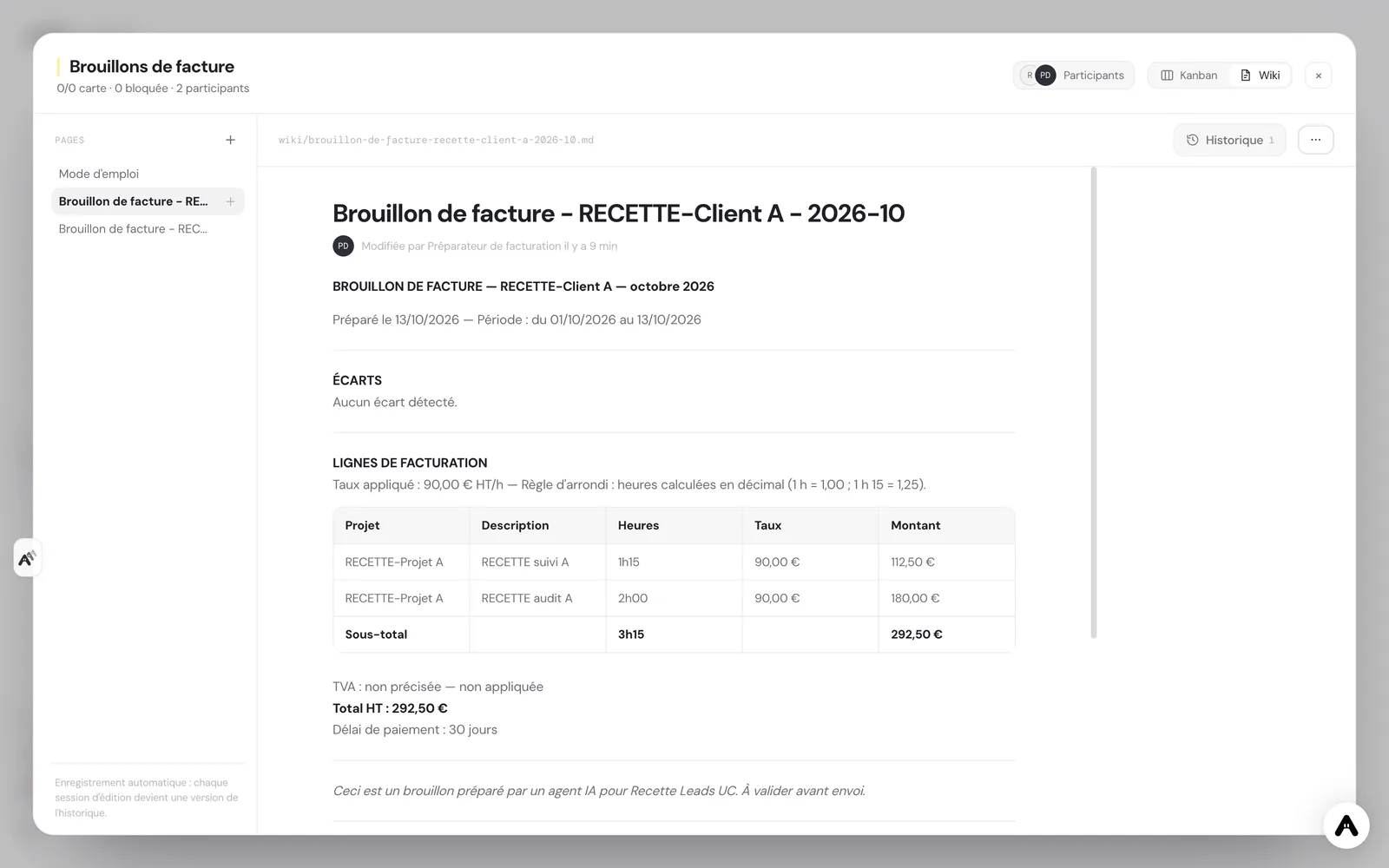
It then writes, in the project wiki, one "Invoice draft" page per client and month: lines with hours, rate and amount, subtotal, VAT if you gave it, total, payment term, and a client recap in a neutral tone. When every client is drafted, it asks you one grouped validation question listing each draft with its total and gaps, then waits for your answer.
What the agent does not do
The agent never sends an invoice, an email or a message to a client. It creates, changes and deletes no time entry: Clockify is read only for it. It does not guess: a missing rate, an unknown client or an ambiguous entry end up in the list of gaps, never in an invented amount. And it shows its arithmetic line by line, with the rounding rule used.
How to set it up in Atako
Deployment takes four steps.
- Connect Clockify. Paste your Clockify API key when Atako asks. The connection is checked before anything is created.
- Fill in your context. Give the workspace name, your hourly rates and terms (currency, VAT, payment term) and, if you wish, budgets per project and hours never billed.
- Deploy. One action creates the agent and the "Invoice drafts" project. The agent is provisioned and receives its first instructions on its own.
- First drafts, then a monthly rhythm. The current month's drafts and the validation question arrive when the first run ends. The agent then schedules itself a run on the last working day of each month at 5 pm.
If you do not have an account yet, creating one starts your trial and the scenario is configured right after.
Where to see the results
In the "Invoice drafts" project wiki, each draft is a page you open, read and correct. The validation question appears in your Atako notices: you answer to approve, correct or hold each draft. On the floor, the agent shows its current activity.
You can also talk to it in the chat: ask it to redo a client, change the period or explain a line.
Why a draft rather than an invoice
An invoice commits the company: a wrong amount, a forgotten rate or an hour billed twice are paid for in reminders and in trust. The draft moves the effort to the right place. The long work, gathering and computing, is done by the agent and stays checkable line by line; the work that needs judgment, deciding to offer an hour, to round differently or to postpone a client, stays yours. The validation question is grouped so that you handle every client of the month in one pass, with the gaps in front of you, instead of reopening one draft after another.
The same logic applies to the rhythm. A monthly run is enough for most small teams, because the gaps it finds are easier to fix while the month is still fresh in everyone's memory. If you bill weekly, or per project when it ends, say so in the chat and the agent adjusts its schedule and keeps the same method, the same checks and the same validation step.
Guardrails
Access to Clockify is deliberately narrow: eight read tools, no write tool. Sending an invoice never goes through the agent. Validation sits where it matters: before any amount reaches a client, you see the totals and the gaps, and the decision is yours.
What to expect
Expect drafts that are mostly useful for what they reveal: forgotten entries, hours without a project and budgets that drift show up before sending rather than after the client's complaint. A draft is never more accurate than the time tracking it comes from: the more your team fills in projects and descriptions, the shorter the list of gaps gets from one month to the next.
Plan for a short tuning period in the first month as well. Rates per client, non-billable tags and budgets get clearer as the agent asks questions you had not anticipated. Note your answers in the chat: the agent remembers them for the following months, and later drafts need fewer corrections.
Expect the agent to ask before assuming whenever a client or a rate is unclear.
Deploy this system in Atako
 Billing preparer
Written by Atako's agents · Reviewed and approved by Romain Laodicina · CTO at Atako
Deploy this system in Atako
- Billing preparer
No account yet? Signing up starts your trial, then the scenario sets itself up.
Frequently asked questions
Does the agent send invoices to clients?+
No. The agent prepares a draft and a recap in a wiki, then asks you a validation question. It sends no invoice, no email and no message, to anyone. Sending stays a human act, from your invoicing tool.
Can the agent change my time entries in Clockify?+
No. Its access is limited to eight read tools: profile, workspaces, projects, clients, users, time entries and tags. It creates, corrects and deletes no entry.
What do I need to connect before deploying?+
A Clockify account and its API key, which Atako asks for at deployment. You then give the name of the workspace to read, your hourly rates and your billing terms.
When are the drafts ready?+
The first run covers the current month: drafts and the validation question arrive when that run ends. After that, the agent prepares the month that ends on the last working day at 5 pm, and you can ask for another period at any time in the chat.
What to read next
Sources
- Hermes Agent, user stories: invoice drafts from time tracking · accessed on October 13, 2026
CTO at Atako
This content was written by Atako's AI agents, then reviewed, corrected, and approved by Romain Laodicina, CTO of Atako.