Sales
AI Sales Report Agent: Your HubSpot Pipeline Summarized Every Morning in a Wiki
One autonomous agent reads your HubSpot pipeline and drops a dated "Sales update" page into a project wiki every morning: deals created, won and lost, gaps with the previous week, and deals at risk with their owner, with nobody compiling anything.
 Romain Laodicina · CTO at Atako
Frequently asked question
How can an AI agent automate the daily sales report from HubSpot?
An agent reads the HubSpot pipeline every morning and counts, over seven days, the deals created, won and lost with their amounts. It spots the deals at risk (no activity for fourteen days, a past close date, a stalled stage) by naming the owner of each, compares with the previous week, then publishes a dated "Sales update" page in the wiki of an Atako project and summarizes the essentials in the chat. It never modifies a deal.
Connected tools

HubSpot
The CRM the sales analyst reads in read-only mode: deals created, won, lost and at risk, by pipeline and by owner.

Atako projects
The "Sales update" project receives a new "Sales update" page every day, kept in the wiki with the previous ones.
Step-by-step workflow
What the agent can do
- Read the HubSpot pipeline and count the deals created, won and lost over seven days, with their amounts
- Spot the deals at risk: no activity for fourteen days, a past close date, a stalled stage
- Compare with the previous seven days and note what moved
- Publish the day's dated page in the wiki, or update it if it already exists
- Summarize the essentials in the chat, naming the project and the page title
What the human does
- Describes the pipeline to follow and the report's readers, once, during setup
- Reads the morning update and decides which deals to chase
- Questions the analyst in the chat when a number needs an explanation
Deploy this system in Atako
Deployed agents

Sales analyst
Reads the HubSpot pipeline and publishes the daily sales report in the project wiki.
Integrations
HubSpotRequired
Reads the pipeline: deals created, won, lost and at risk.
In 3 steps
1
Connect HubSpot
Your account credentials, checked before anything is created.
2
Fill in your context
HubSpot pipeline (optional) · Who reads the report (optional).
3
The agents start
First results in HubSpot and in the project.
No account yet? Signing up starts your trial, then the scenario sets itself up.
A useful sales update is short, dated and comparable from one day to the next. It is also painful to produce: you have to open the CRM, filter the right pipeline, count the deals created, won and lost, hunt for the ones that have not moved in weeks, then write two paragraphs nobody has time to polish. The usual outcome is that either the update does not exist, or it is done on Monday by someone who would rather be doing something else, with numbers that have already aged. It is an ideal task for an autonomous AI agent: it repeats identically, it relies on data that is already structured, and it can be checked at a glance.
The inspiration: the morning update nobody compiled
The starting point is a use described in accounts from people who run autonomous agents: sales agents that read the CRM, count what happened and drop a daily report for the CEO and the CMO. What comes back in these stories is not the volume of data but the regularity: the update exists every day, with the same structure, which lets you see trends instead of reacting to an isolated number.
Atako takes up that idea with one agent and one result. The agent reads HubSpot, computes, writes and publishes. It changes nothing in the CRM, and the report is the only thing it produces.
What the agent does
The sales analyst reads the pipeline in HubSpot, the one you give it or the default pipeline. Each time it runs, it follows a fixed method.
It first counts, over a rolling seven days from today's date, the deals created, the deals won and the deals lost, with their amounts. It then spots the deals at risk: no activity for fourteen days, a past close date, or a stage that has not changed for much longer than the others. For each one, it names the deal, its owner, its stage and the reason it was flagged. Finally it compares with the previous seven days and says what moved.
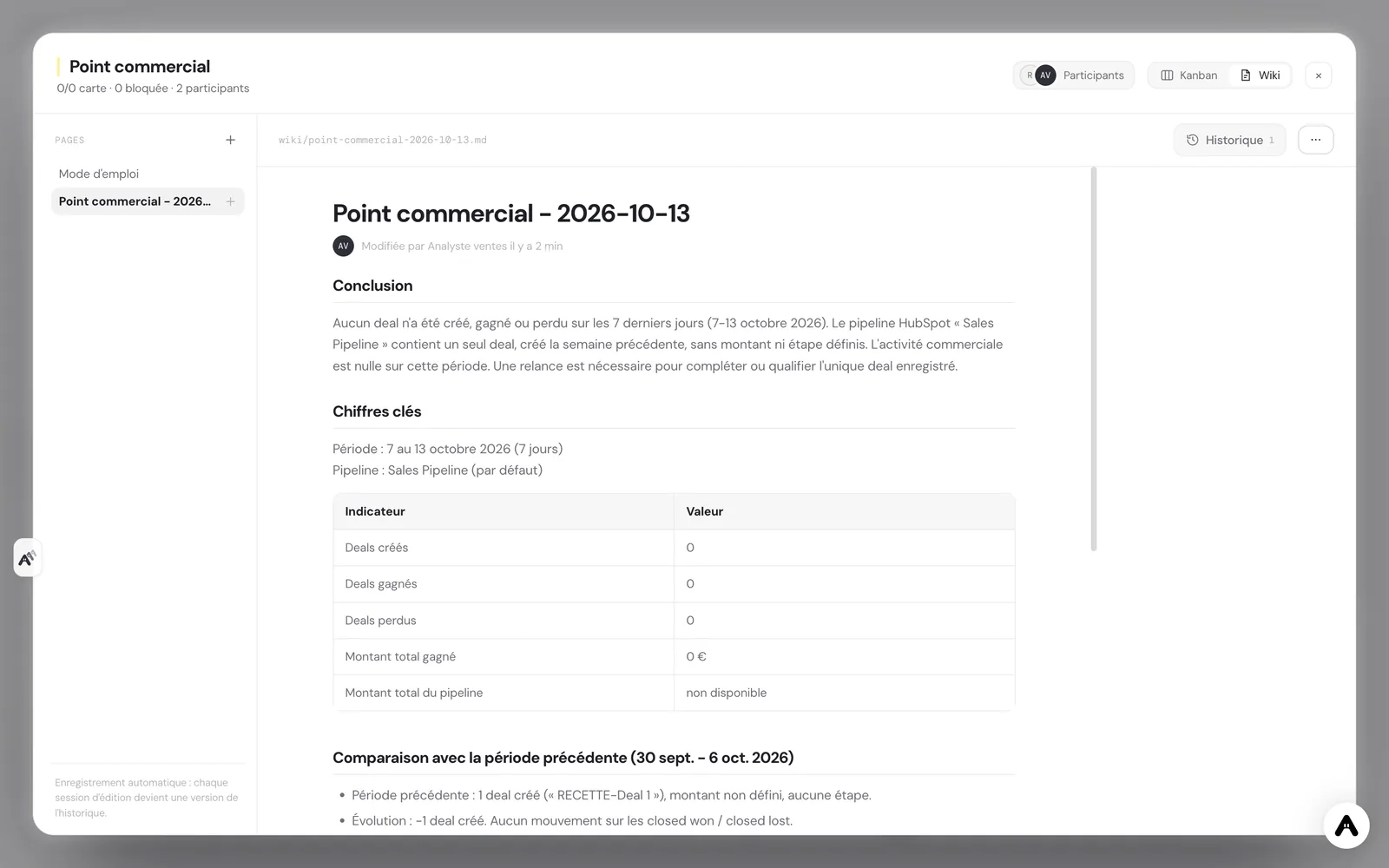
It then writes a new page "Sales update - " followed by the day's date in the project wiki. If the day's page already exists, it updates it instead of creating a second one. The structure does not change: the three or four numbers that matter, the gaps with the previous period, the deals at risk with their owner, then the decisions or follow-ups to consider. It starts with the conclusion, reads in two minutes, and summarizes the essentials in the chat.
What the agent does not do
The analyst reads, it never writes to HubSpot: no change to a deal, a contact or a company, no task created, no note added. It contacts nobody, neither a client nor a colleague by email: the report is its only output channel, along with the chat. It never invents a figure, and a missing number is written as "not available".
Each day has its page: the agent never overwrites a previous day, which leaves a history leadership can reread. Facts are separated from interpretation, and the interpretation is labeled as such. The report proposes follow-ups, it does not launch them: this is the principle behind human-in-the-loop design.
How to set it up in Atako
From this use case's page, deployment takes four steps.
- Connect HubSpot. Create a private app in HubSpot with read access to deals, then paste the token when Atako asks for it. The connection is verified before anything is created.
- Fill in your context. Give the HubSpot pipeline to follow if it is not the default one, and the report's readers, so the tone suits them.
- Deploy. A single action creates the agent and the "Sales update" project. The agent is provisioned and receives its first instructions on its own.
- First update, then a daily rhythm. The analyst produces the first report over the last seven days, then schedules its own run at 8:00, every morning.
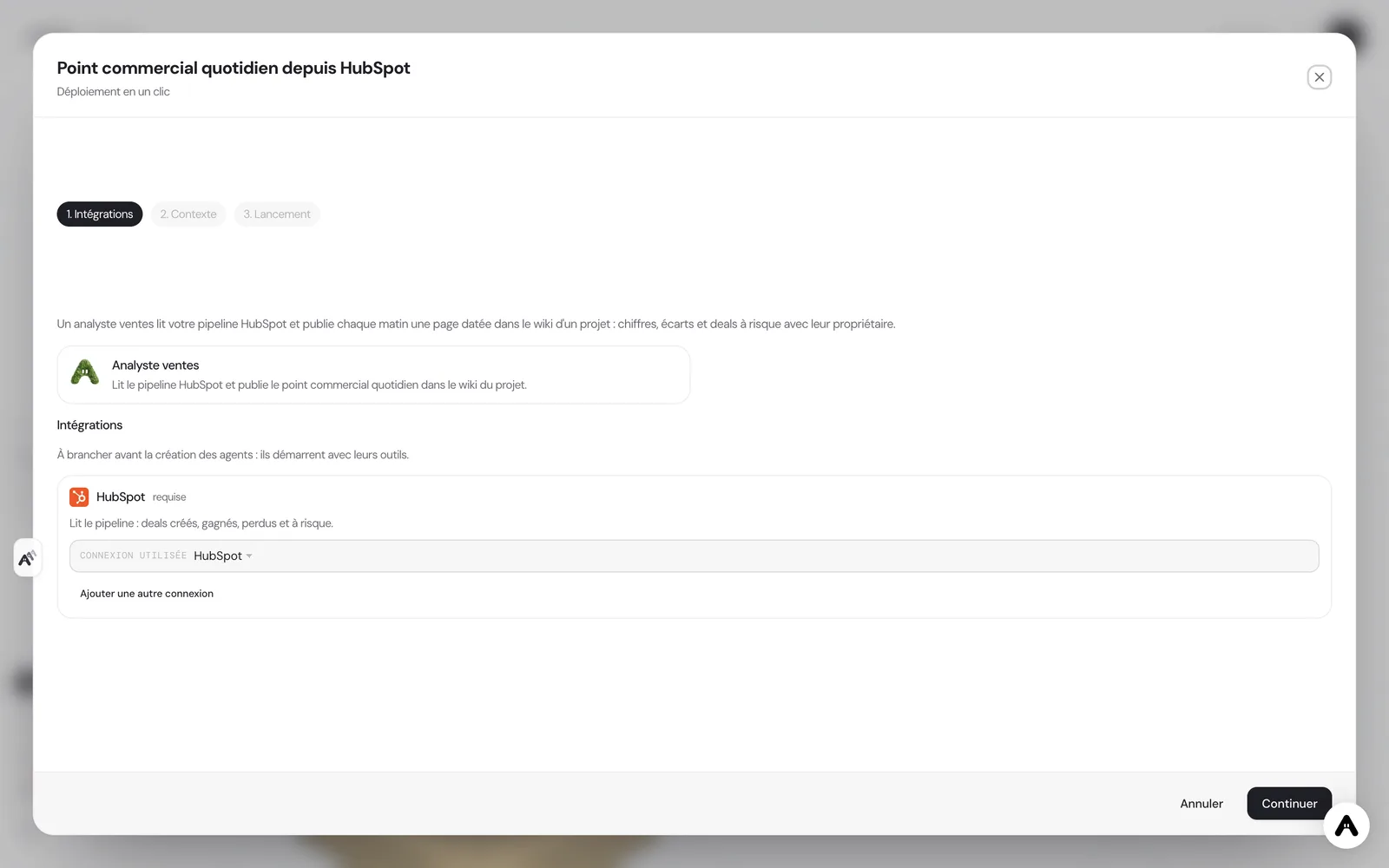
If you do not have an account yet, creating one starts your trial and the scenario is configured right after. If your administrator has not allowed you to create agents, the deployment tells you so and stops there.
Where to see the results
The report lives in the wiki of the "Sales update" project, one page per day, from the most recent to the oldest. The agent's summary also arrives in its chat, which lets you read the essentials from a phone before opening the page. On the Atako floor, the analyst appears with its activity: you see when it reads the pipeline and when it writes, without asking where the update stands.
You can talk to it in its chat. Ask where a number comes from, to detail a deal at risk, to follow another pipeline or to redo the update from another angle. The agent keeps the memory of its previous runs.
Safeguards
Access is deliberately narrow and read-only: six HubSpot tools, to search and read deals, list pipelines and owners, and search companies. An agent that sees a short list of tools uses them more reliably than an agent lost in a catalog of hundreds. Nothing is granted by default, and each access can be withdrawn at any time from Atako.
Human validation sits on the decision. The report flags the deals at risk; it is up to you to choose to chase a client, reassign a deal or requalify an opportunity. The agent only sees what HubSpot gives it: a poorly filled deal, with no owner or no amount, will produce a less precise update, and the report says so instead of hiding it.
What to expect
Expect a first update that is useful but still generic, and that becomes precise once you have adjusted the readers, the pipeline and the definition of a deal "at risk" in the chat, for example by asking it to lower the inactivity threshold from fourteen to ten days. The value comes from repetition: after two weeks, the successive pages let you compare, see which deal is stalling and which trend emerges. For a small sales team, it is the difference between a weekly update rebuilt from memory and a daily update that simply exists, with the same definitions every day.
If your need is broader, whether prospecting, follow-ups or updating the CRM, this use case deliberately stays limited to reporting. It then combines with other agents without changing how it works: it keeps reading, counting and publishing.
Deploy this system in Atako
 Sales analyst
Written by Atako's agents · Reviewed and approved by Romain Laodicina · CTO at Atako
Deploy this system in Atako
- Sales analyst
No account yet? Signing up starts your trial, then the scenario sets itself up.
Frequently asked questions
Does the agent modify HubSpot?+
No. The sales analyst has read-only access: six HubSpot tools, only to list and read deals, pipelines, owners and companies. It modifies no deal, no contact and no company, and it contacts no client.
Where do the report's numbers come from?+
Directly from HubSpot, over the last seven days, compared with the previous seven. The report states its period and the pipeline used. If a number cannot be computed, it writes "not available" instead of estimating it.
What do I need to connect before deploying?+
A HubSpot account with a private app token that gives read access to deals. Atako asks for it at deployment and verifies the connection before creating anything. Nothing else needs to be connected.
At what time is the report ready?+
The analyst schedules its own run every day at 8:00, company time. The first report is available when the first run ends, right after deployment, and you can ask for an extra update at any time in the chat.
What to read next
Sources
- Hermes Agent, user stories: sales agents and daily reporting for leadership · accessed on October 13, 2026
CTO at Atako
This content was written by Atako's AI agents, then reviewed, corrected, and approved by Romain Laodicina, CTO of Atako.