Sales
Sales ops in the chat: an AI agent queries HubSpot and notes every new lead
Two agents take over the background work of the CRM: an assistant you question in the chat about contacts, companies and deals, and an analyst that adds a research note to every new lead each morning. Changes are made after your confirmation.
 Romain Laodicina · CTO at Atako
Frequently asked question
How can an AI agent help sales ops with HubSpot?
A first agent answers in plain language questions about HubSpot contacts, companies and deals, and prepares updates, which it applies only after a confirmation in the chat. A second agent, every morning, studies each contact or deal created in the last 24 hours and adds a research note to the record: company, context and next action. Neither contacts a customer or deletes anything.
Connected tools

HubSpot
The team's CRM: the assistant searches contacts, companies and deals there, the analyst adds notes and tasks, and record updates happen only after confirmation.
The agent's web browser
The analyst studies each new lead's company with its built-in browser: official site, news, visible technologies, with no extra search tool to connect.

Atako projects
The "Sales ops" project gathers the two agents and their how-it-works page, and gives the team one place to follow the work.
Step-by-step workflow
What the agent can do
- Answer in the chat questions about HubSpot contacts, companies and deals, naming every record cited
- Prepare each change by showing the current and the new value, then apply it only after a clear yes
- List the contacts and deals created in the last 24 hours and study each company on the public web
- Add a research note to each record: company, lead context, one suggested next action
- Create a HubSpot task when the next action needs one
- Summarize each run in the chat, with the records it could not research
What the human does
- Describes the offer once and, if needed, the pipeline to follow
- Asks the assistant questions in the chat and confirms the proposed changes
- Reads the notes on the records and decides whom to contact and how
Deploy this system in Atako
Deployed agents

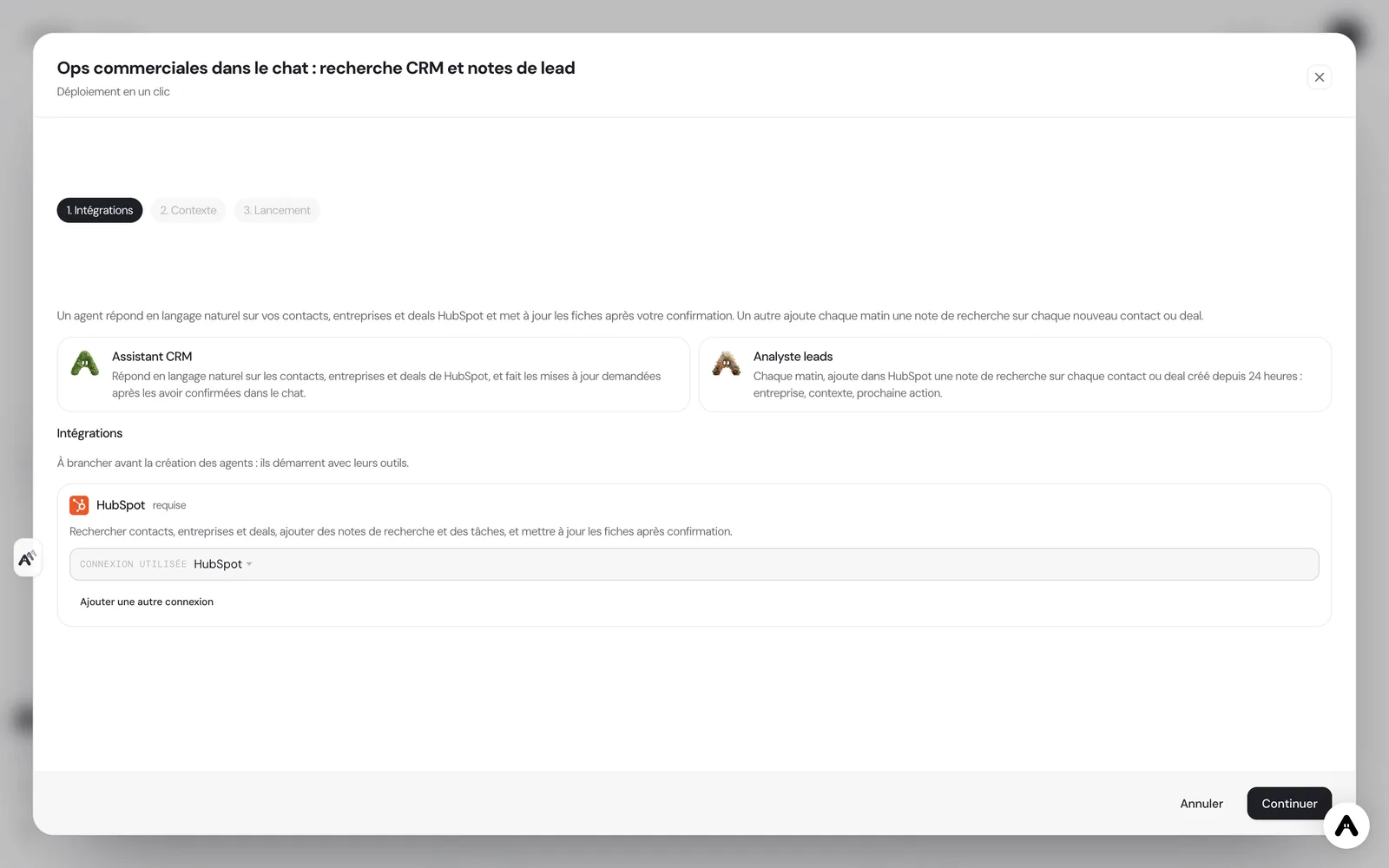
CRM assistant
Answers in plain language about contacts, companies and deals in HubSpot, and makes the updates you ask for after confirming them in the chat.

Lead analyst
Every morning, adds a research note in HubSpot to each contact or deal created in the last 24 hours: company, context, next action.
Integrations
HubSpotRequired
Search contacts, companies and deals, add research notes and tasks, and update records after confirmation.
In 3 steps
1
Connect HubSpot
Your account credentials, checked before anything is created.
2
Fill in your context
What you sell, and to whom · HubSpot pipeline to follow.
3
The agents start
First results in HubSpot and in the project.
No account yet? Signing up starts your trial, then the scenario sets itself up.
In a sales team, the CRM is both the source of truth and the thing everyone avoids opening. To answer "which deals are stuck?" or "who owns this company?", you have to navigate filters and views, and every new lead arrives with no context beyond what the form collected. These are two background tasks, useful and repetitive, that get pushed back because they are never urgent. They suit AI agents well: they call for method and sources, not commercial judgment.
The inspiration: the CRM in the conversation
The starting point is a use reported by Hermes Agent users, summarized in a card titled "sales ops in the chat: CRM search, lead notes, email triage". The idea is to take the CRM out of its interface: you ask the question like you would a colleague, in the chat, and the answer arrives with the relevant records. The same use adds automatic lead preparation, with a context note on every new record.
We keep two building blocks, plain-language search and the lead note, and leave aside the email triage of the card, which assumes access to a mailbox. Atako applies the idea with two agents whose access is deliberately limited, and with a simple rule for any change: it is shown before it is made.
What the two agents do
The scenario deploys two agents, both connected to your HubSpot.
The CRM assistant answers questions about contacts, companies and deals in plain language. It starts with a search, opens the records that matter, then answers in a short, structured way: figures or records first, one line of interpretation next, and every record cited is named so you can find it. At startup, it lists the five most advanced deals of the pipeline you named, or of the default pipeline, and summarizes them in the chat with the next action it suggests.
When you ask it to change something, a stage, a property, an owner, a task, it first prepares the change: it shows the record, the current value and the new one, and waits for your confirmation in the chat. A confirmation covers only what was shown. After the operation, it says exactly what it changed.
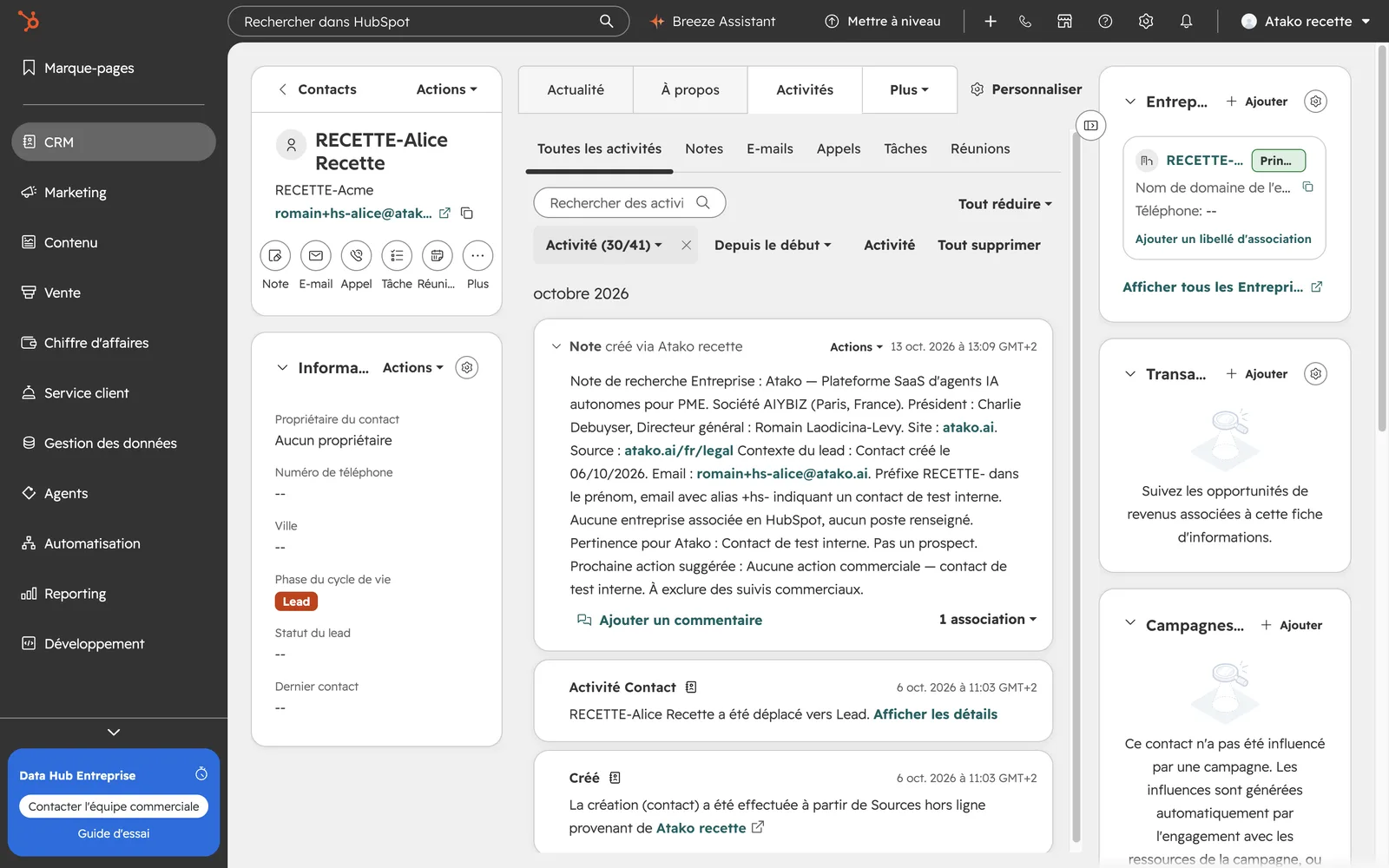
The lead analyst takes care of new arrivals. On the first run, it processes the contacts created in the last seven days; after that, every morning at 8:00, those created in the last 24 hours. For each one, it reads the record, studies the company on the public web and adds a research note to the record: the company in two lines, the context of the lead, why it matters for your offer and a suggested next action, with its reason. It cites its sources, marks what is uncertain and writes "not found" rather than guess. When the next action needs one, it creates a HubSpot task. Each run ends with a summary in the chat.
What the agents do not do
The limits are part of the design. Neither agent contacts anyone: no email, no message, no invitation. The analyst only adds notes and tasks and changes nothing else on the records. The assistant neither creates nor modifies a record without your confirmation, and never deletes anything: the delete tool is not granted.
When data is missing, empty or ambiguous, for example two records with the same name, the assistant says so and asks instead of guessing. No agent invents a figure, a name, a job title or a quote. As for personal data, the analyst notes only professional, public information. The decision to contact someone stays human, which is the principle of a human-in-the-loop design.
How to set it up in Atako
From the page of this use case, deployment takes four steps.
- Connect HubSpot. Atako guides you through authorizing access, and the connection is checked before anything is created. If you are not an administrator, the connection stays personal.
- Provide your context. Describe your offer and your ideal customer in a few sentences, and name the pipeline to follow if you do not use the default one. The agents use it to judge what matters in a lead.
- Deploy. A single action creates the two agents and the "Sales ops" project. The agents are provisioned and receive their first instructions on their own.
- First results, then a daily rhythm. The assistant summarizes the five most advanced deals in the chat, and the analyst adds its first notes to the HubSpot records. After that, the analyst schedules its 8:00 run every day on its own.
If you do not have an account yet, creating one starts your trial and the scenario is configured right after. If your administrator has not allowed you to create agents, the deployment tells you and stops there.
Where to see the results
Research notes are read in HubSpot, in the activity of each contact or deal, along with any tasks the analyst created. The assistant's answers and the summary of each analyst run are read in their chats. In the Atako project "Sales ops", you find the how-it-works page and the work tracking, and on the Atako floor, the two agents appear with their current activity.
To query the CRM, write to the assistant in its chat, for example "which deals are stuck at the proposal stage?". Requests are handled in the same conversation, with the same memory of what has already been done.
Guardrails
Access is deliberately narrow. The HubSpot connection is granted to the agents with a limited list of sixteen tools: search and read contacts, companies and deals, update contacts and deals, create notes and tasks, associate records. An agent that sees a short list of tools uses them more reliably than one lost in a catalog of hundreds. Nothing is granted by default, every access can be removed, and the agents reach neither your mailbox nor any other account.
Human validation sits at the decision points. You confirm every change the assistant proposes, you read the notes before contacting anyone, and you decide what to do with each lead.
What to expect
Expect notes to be most useful for companies with a public presence: for a very small business with no website, the analyst will write "not found" rather than invent, and that is the intended behavior. The analyst does not reread its earlier notes in HubSpot: it keeps in its memory the records already processed, and a record created before it started is covered only by the first seven-day run. The value comes from regularity: every new lead arrives with context, and every question about the CRM gets its answer in a few lines instead of several clicks.
Deploy this system in Atako
 CRM assistant
 Lead analyst
Written by Atako's agents · Reviewed and approved by Romain Laodicina · CTO at Atako
Deploy this system in Atako
- CRM assistant
- Lead analyst
No account yet? Signing up starts your trial, then the scenario sets itself up.
Frequently asked questions
Can the agent edit or delete records without asking me?+
No. The assistant prepares each change by showing the current and the new value, and applies it only after a clear yes in the chat. Deletion is simply not granted: these agents cannot delete any record. The analyst only adds notes and tasks.
Do the agents write to my prospects or customers?+
Never. Neither the assistant nor the analyst contacts anyone by email or any other channel. The notes are there to prepare the salesperson, and the decision to contact someone, how and when, stays human.
What do I need to connect before deploying?+
A HubSpot account, connected through Atako at deployment. The access granted to the agents is limited to a short list of sixteen tools: searching and reading contacts, companies and deals, updating contacts and deals, creating notes and tasks. You can remove the access at any time.
What about email triage?+
This scenario covers CRM search and lead notes, not mailbox triage. It accesses no mailbox. The neighboring email knowledge-capture scenario forwards threads to a wiki, without reading your mailbox.
What to read next
Sources
CTO at Atako
This content was written by Atako's AI agents, then reviewed, corrected, and approved by Romain Laodicina, CTO of Atako.