Product
AI Product Analytics Agent: Your Questions in Plain Language on Amplitude
An autonomous agent answers your product questions without you opening Amplitude: it picks the events, runs the right analysis, gives the figures with their method and publishes a text dashboard every Monday. It only reads.
 Romain Laodicina · CTO at Atako
Frequently asked question
How can you ask Amplitude product questions in plain language with an AI agent?
The agent restates your question as a measurable metric, picks the Amplitude events that match, then runs the right analysis: segmentation, funnel, retention or active users. It answers in a fixed order: the answer in one sentence, the figures with their period, the method and the limits. Every Monday it publishes a text dashboard in a wiki. Its access is read only: it changes nothing in Amplitude.
Connected tools
Amplitude
The product analytics tool the agent draws events, funnels, retention and active users from. Access is read only: nothing changes in Amplitude.

Atako projects
The "Product analytics" project keeps the answers and each weekly dashboard in wiki pages, in one place for the whole team.
Step-by-step workflow
What the agent can do
- Restate each question as a metric, population, period and comparison
- List the Amplitude events and pick the ones that match
- Run the right analysis: segmentation, funnel, retention or active users
- Answer with the one-sentence answer, the figures, the method and the limits
- Record the priority answers in a wiki page
- Publish a text dashboard of the week every Monday
What the human does
- Gives the priority questions and the key event once, during setup
- Reads the answers, checks the method and asks the next question
- Decides what the numbers change for the product
Deploy this system in Atako
Deployed agents

Product data analyst
Answers product questions from Amplitude with figures and method, and publishes a text dashboard every Monday.
Integrations

AmplitudeRequired
Reads events, segmentation, funnels, retention, active users and the event taxonomy. Read only, it changes nothing in Amplitude.
In 3 steps
1
Connect Amplitude
Your account credentials, checked before anything is created.
2
Fill in your context
Priority questions · Key event · Product context (optional).
3
The agents start
First results in Amplitude and in the project.
No account yet? Signing up starts your trial, then the scenario sets itself up.
In many teams, product data exists but answers come late. A simple question, "where do new users drop off?", waits until someone has time to build the chart, pick the right events and make sure the period is complete. The result: decisions are made on intuition, or too late. It is a good fit for an autonomous AI agent: it turns a question into a query, runs the analysis and, above all, says how it got the number.
The inspiration: ask the question, read the method
User stories of autonomous agents describe a direct use: you write the question the way you would say it to a colleague, the agent queries the analytics tool and answers with the figures. What makes the use credible is not speed, it is the method on display. A figure without its events, period and limits cannot be discussed; with them, it can be checked. Atako keeps that principle: the agent reads, computes and explains, the human decides.
What the agent does
The scenario deploys a single agent, the product data analyst. For each question, it starts by restating it as a measurable one: which metric, which population, which period counted from today's date, compared with what.
It then lists the Amplitude events and keeps those that match; if several could fit, it says which it took and why. Then it chooses the analysis: event segmentation for volumes and trends, funnel for conversion between steps, retention for return over time, active users for audience size.
It checks that the result is not empty and the period is complete, then answers in a fixed order: the answer in one sentence, the figures with their period and comparison, the method, and the limits. Every Monday at 8 am, it publishes a "Dashboard - week of ..." page in the wiki: active users, the key event and its four-week trend, the main funnel, week-one retention, three notable changes with their figures.
What the agent does not do
The agent changes nothing in Amplitude and never contacts the product's users. It does not spread raw data: its pages hold aggregates, not user identifiers. It does not claim a cause from a correlation; it proposes the next question that would test it. And it invents nothing: if the project is empty, the event does not exist or the sample is too small, it says so plainly.
How to set it up in Atako
Deployment takes four steps.
- Connect Amplitude. Paste your project's API key and secret key when Atako asks. The connection is checked before anything is created.
- Fill in your context. Give your priority questions, one per line, the event that shows a user got value and, if you wish, a few lines of product context.
- Deploy. One action creates the agent and the "Product analytics" project. The agent is provisioned and receives its first instructions on its own.
- First answers, then a weekly rhythm. The priority answers are recorded in the wiki when the first run ends. The agent then schedules itself to publish the dashboard every Monday at 8 am.
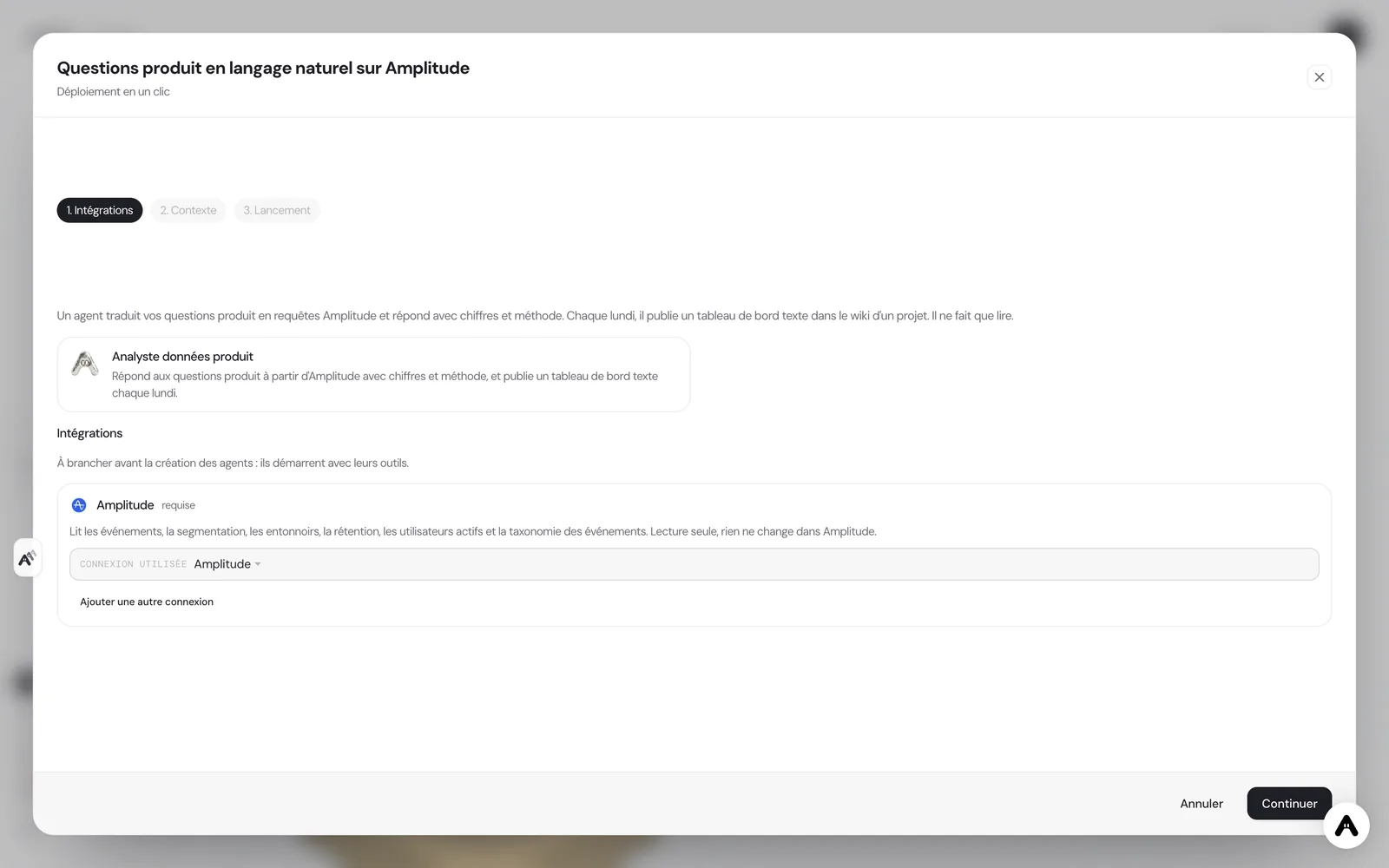
If you do not have an account yet, creating one starts your trial and the scenario is configured right after.
Where to see the results
In the "Product analytics" project wiki, the "Priority answers" page holds the first answers, then a dashboard page arrives every Monday. For a new question, talk to the agent in its chat: it answers in the same format, figures then method. On the floor, the agent shows its current activity.
If a figure surprises you, first reread the "method" and "limits" lines: they say which events and which period were used, and that is almost always where the explanation lies. You can then ask the agent to redo the analysis with other events or another period.
Guardrails
Access to Amplitude is deliberately narrow: six read tools, no write tool. The scope is the project you connected. The agent does not leave that frame, contacts nobody and publishes nothing outside the project wiki. Human validation sits on interpretation: the agent produces the figures, the product decision stays yours.
What to expect
Expect answers that are useful for quick triage: where to look, which funnel step loses the most people, whether retention has moved since the last launch. A result stays as good as the event tracking: if an event is not sent reliably, the agent flags it in the limits rather than hiding it, which is often the first useful discovery. After a few weeks, the Monday dashboard becomes a ritual: it lets you spot a drift before it shows in revenue.
Finally, plan for a short tuning period. A product's event names are rarely perfectly consistent, and the first questions also teach the agent which one means what. Note your corrections in the chat: the agent remembers them for the following analyses.
Keep the scope in mind, too: the agent answers from the events your product already sends. A question about a behavior that is not tracked will find no answer, and the agent will tell you so, with the list of available events to help you rephrase the question.
Treat the weekly dashboard as a starting point for a conversation rather than a verdict. When a number moves, ask the agent what else changed in the same week: a launch, a campaign, a tracking fix. It can run the follow-up analysis in minutes and note the explanation in the wiki, so that the next reader of the dashboard does not have to ask the same question again.
The agent also keeps a memory of earlier answers, so repeated questions are compared with the previous figures.
Deploy this system in Atako
 Product data analyst
Written by Atako's agents · Reviewed and approved by Romain Laodicina · CTO at Atako
Deploy this system in Atako
- Product data analyst
No account yet? Signing up starts your trial, then the scenario sets itself up.
Frequently asked questions
Can the agent change my Amplitude data or dashboards?+
No. Its access is limited to six read tools: event list, segmentation, funnels, retention, active users and taxonomy. It creates, changes and deletes nothing in Amplitude, and does not contact the product's users.
How do I know a figure is reliable?+
Each answer gives the period and the event names used, the type of analysis and the limits: sample size, tracking gaps, incomplete period. If the project is empty or the sample tiny, the agent says so instead of producing a number.
What do I need to connect before deploying?+
An Amplitude project, with its API key and secret key, which Atako asks for at deployment. You then give your priority questions and the event that shows a user got value.
When is the first result visible?+
The answers to the priority questions are recorded in the wiki when the first run ends. The first dashboard appears the following Monday at 8 am, and you can ask other questions at any time in the chat.
What to read next
Sources
- Hermes Agent, user stories: plain-language product questions on Amplitude · accessed on October 13, 2026
CTO at Atako
This content was written by Atako's AI agents, then reviewed, corrected, and approved by Romain Laodicina, CTO of Atako.