Engineering
AI Sprint Report Agent: Your GitHub Repository Summarized Every Morning in a Wiki
One autonomous agent reads your GitHub repository and drops a dated "Sprint update" page into a project wiki every morning: pull requests merged and open, issues, releases, blockers and pull requests that linger, with nobody compiling anything.
 Romain Laodicina · CTO at Atako
Frequently asked question
How can an AI agent automate the daily sprint report from GitHub?
An agent reads the GitHub repository every morning and counts, over seven days, the pull requests merged and open, those waiting for review for more than three days, the issues opened and closed and the releases. It spots the blockers (pull requests open for more than five days, topics that keep piling up), compares with the previous week, then publishes a dated "Sprint update" page in the wiki of an Atako project and summarizes the essentials in the chat. It comments on, labels and merges nothing.
Connected tools

GitHub
The repository the delivery analyst reads in read-only mode: pull requests, issues, commits and releases of the last seven days.

Atako projects
The "Sprint update" project receives a new "Sprint update" page every day, kept in the wiki with the previous ones.
Step-by-step workflow
What the agent can do
- Read the GitHub repository and count the pull requests merged and open, the issues opened and closed, the releases over seven days
- Spot the pull requests waiting for review for more than three days and those open for more than five days
- Spot the topics piling up in issues and the releases running late
- Publish the day's dated page in the wiki, or update it if it already exists
- Summarize the essentials in the chat, naming the project and the page title
What the human does
- Gives the repository to follow and the report's readers, once, during setup
- Reads the morning update and decides what to unblock first
- Questions the analyst in the chat when a number needs an explanation
Deploy this system in Atako
Deployed agents

Delivery analyst
Reads the GitHub repository and publishes the daily sprint report in the project wiki.
Integrations
GitHubRequired
Reads the repository: pull requests, issues, commits and releases.
In 3 steps
1
Connect GitHub
Your account credentials, checked before anything is created.
2
Fill in your context
GitHub repository · Who reads the report (optional).
3
The agents start
First results in GitHub and in the project.
No account yet? Signing up starts your trial, then the scenario sets itself up.
A useful sprint update is short, dated and comparable from one day to the next. It is also painful to produce: you have to open the repository, count the pull requests merged, spot the ones waiting for a review, go through the issues, check whether a release is coming, then write two paragraphs nobody has time to polish. The usual outcome is that either the update does not exist, or it is thrown together before the meeting, with the blockers discovered too late. It is an ideal task for an autonomous AI agent: it repeats identically, it relies on data that is already structured, and it can be checked at a glance.
The inspiration: the morning update nobody compiled
The starting point is a use described in accounts from people who run autonomous agents: agents that read the engineering team's tools, count what happened and drop a sprint report every morning. What comes back in these stories is not the volume of data but the regularity: the update exists every day, with the same structure, which lets you see trends instead of reacting to an isolated number.
Atako takes up that idea with one agent and one result. The agent reads GitHub, computes, writes and publishes. It changes nothing in the repository, and the report is the only thing it produces.
What the agent does
The delivery analyst reads the repository in GitHub, the one you give it as owner/name. Each time it runs, it follows a fixed method.
It first counts, over a rolling seven days from today's date, the pull requests merged, those still open with their age, those waiting for review for more than three days, the issues opened, the issues closed and the releases published. It then spots the blockers: pull requests open for more than five days, issues piling up on the same topic, a release running late given the commits. It names each one with its link and its author. Finally it compares with the previous seven days and says what moved.
It then writes a new page "Sprint update - " followed by the day's date in the project wiki. If the day's page already exists, it updates it instead of creating a second one. The structure does not change: the three or four numbers that matter, progress compared with the previous period, the blockers and the pull requests that linger, then the decisions to consider. It starts with the conclusion, reads in two minutes, and summarizes the essentials in the chat.
What the agent does not do
The analyst reads, it never writes to GitHub: no comment, label, review, merge or closure. It pushes no code. It contacts nobody: the report is its only output channel, along with the chat. It never invents a figure or a link, and a missing number is written as "not available".
Each day has its page: the agent never overwrites a previous day, which leaves a history the team can reread. Facts are separated from interpretation, and the interpretation is labeled as such. The report proposes priorities, it does not impose them: this is the principle behind human-in-the-loop design.
How to set it up in Atako
From this use case's page, deployment takes four steps.
- Connect GitHub. Give Atako read access to the repository to follow when it asks. The connection is verified before anything is created.
- Fill in your context. Give the repository, as owner/name, and the report's readers, so the tone suits them.
- Deploy. A single action creates the agent and the "Sprint update" project. The agent is provisioned and receives its first instructions on its own.
- First update, then a daily rhythm. The analyst produces the first report over the last seven days, then schedules its own run at 8:00, every morning.
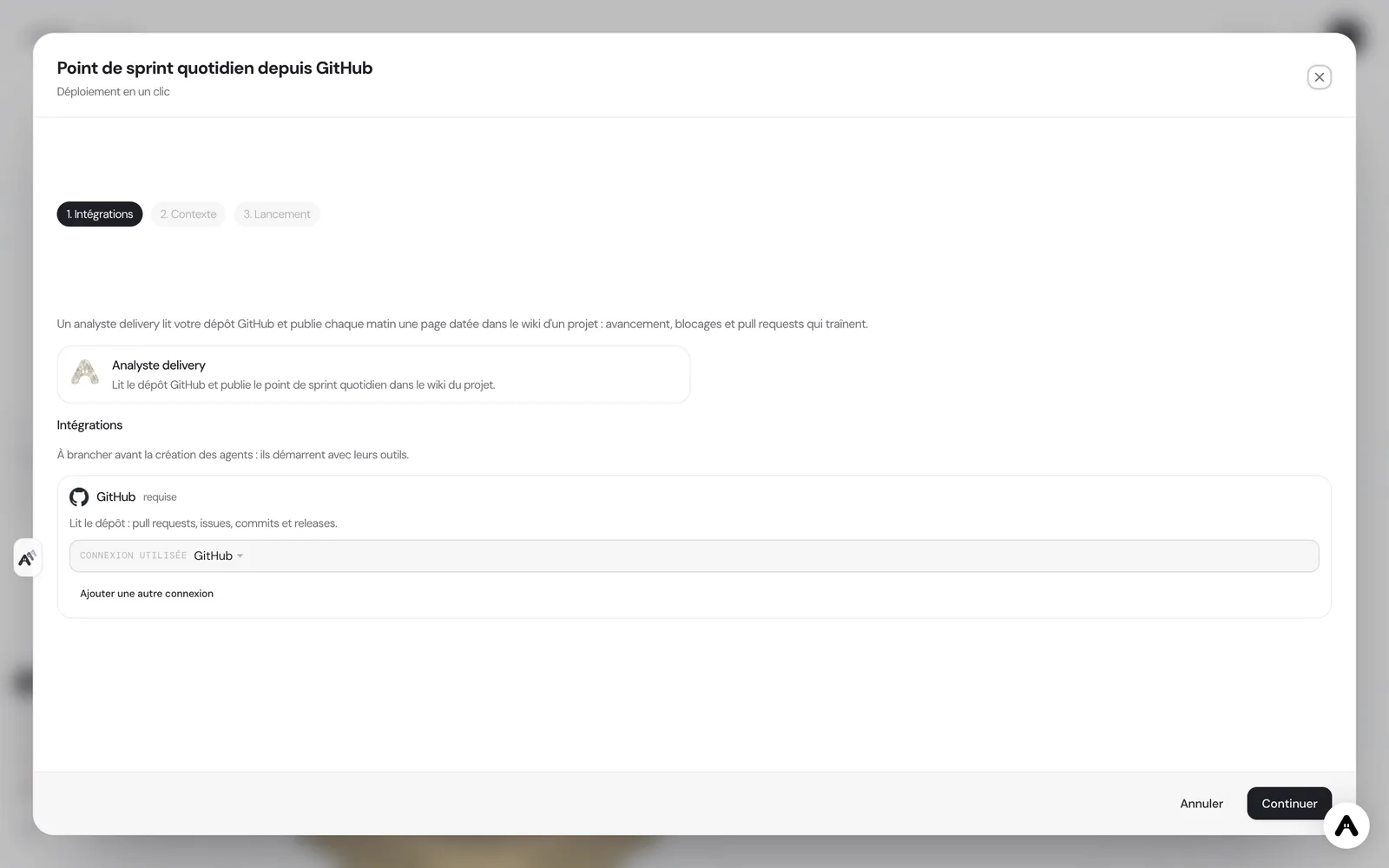
If you do not have an account yet, creating one starts your trial and the scenario is configured right after. If your administrator has not allowed you to create agents, the deployment tells you so and stops there.
Where to see the results
The report lives in the wiki of the "Sprint update" project, one page per day, from the most recent to the oldest. The agent's summary also arrives in its chat, which lets you read the essentials from a phone before opening the page. On the Atako floor, the analyst appears with its activity: you see when it reads the repository and when it writes, without asking where the update stands.
You can talk to it in its chat. Ask where a number comes from, to detail a blocker, to follow another repository or to redo the update from another angle. The agent keeps the memory of its previous runs.
Safeguards
Access is deliberately narrow and read-only: eight GitHub tools, to list repositories, read a repository, list and read pull requests, list and search issues, and list commits and releases. An agent that sees a short list of tools uses them more reliably than an agent lost in a catalog of hundreds. Nothing is granted by default, and each access can be withdrawn at any time from Atako.
Human validation sits on the decision. The report flags the blockers and the pull requests that linger; it is up to the team to choose to nudge a reviewer, split a pull request or postpone a release. The agent only sees what GitHub gives it: a pull request with no description, or a repository whose issues are not labeled, will produce a less precise update, and the report says so instead of hiding it.
What to expect
Expect a first update that is useful but still generic, and that becomes precise once you have adjusted the readers and the thresholds in the chat, for example by asking it to flag pull requests waiting for review for two days rather than three. The value comes from repetition: after two weeks, the successive pages let you compare, see which blocker lasts and which trend emerges. For a small engineering team, it is the difference between a summary rebuilt from memory before the meeting and a daily update that simply exists, with the same definitions every day.
If your need is broader, whether reviewing pull requests or triaging issues, this use case deliberately stays limited to reporting. It then combines with other agents without changing how it works: it keeps reading, counting and publishing.
Deploy this system in Atako
 Delivery analyst
Written by Atako's agents · Reviewed and approved by Romain Laodicina · CTO at Atako
Deploy this system in Atako
- Delivery analyst
No account yet? Signing up starts your trial, then the scenario sets itself up.
Frequently asked questions
Does the agent modify the GitHub repository?+
No. The delivery analyst has read-only access: eight GitHub tools, only to list and read repositories, pull requests, issues, commits and releases. It comments on, labels, merges and closes nothing.
Where do the report's numbers come from?+
Directly from GitHub, over the last seven days, compared with the previous seven. The report states its period and the repository used. If a number cannot be computed, it writes "not available" instead of estimating it.
What do I need to connect before deploying?+
A GitHub access that gives read access to the chosen repository. Atako asks for it at deployment and verifies the connection before creating anything. Nothing else needs to be connected.
At what time is the report ready?+
The analyst schedules its own run every day at 8:00, company time. The first report is available when the first run ends, right after deployment, and you can ask for an extra update at any time in the chat.
What to read next
Sources
- Hermes Agent, user stories: automated sprint reporting · accessed on October 13, 2026
CTO at Atako
This content was written by Atako's AI agents, then reviewed, corrected, and approved by Romain Laodicina, CTO of Atako.