Sales
AI Agent for Meeting Preparation: a One-Page Brief from HubSpot and the Web
An autonomous agent prepares your meetings for you: it reads the account history in HubSpot, looks up what happened recently on the web, then drops a one-page brief in a wiki with five questions to ask, the risks and a proposed next step.
 Romain Laodicina · CTO at Atako
Frequently asked question
How can an AI agent prepare a sales meeting?
The agent finds the company and the contact in HubSpot, reads the deals, notes, emails and meetings already logged, then researches recent news and the contact's current role on the web. It writes a one-page brief in a wiki: context, history, stakes, five questions, risks and a proposed next step. It adds a note in HubSpot with the link to the brief. It contacts nobody: a human attends the meeting and decides.
Connected tools

HubSpot
The CRM the agent draws the account history from: deals, notes, logged emails and meetings. It also leaves a note there that points to the brief.
Agent web browser
The agent reads the company site, the news of the last 90 days and the contact's public pages with its built-in browser, without any tool to connect.

Atako projects
The "Meeting preparation" project keeps each brief in a wiki page, in one place for the whole team.
Step-by-step workflow
What the agent can do
- Find the meeting's company and contact in HubSpot, and flag duplicate records
- Read the account history: deals and their stage, notes, logged emails, past and upcoming meetings
- Research the last 90 days of news on the web and the contact's current role
- Write a one-page brief: context, history, stakes, five questions, risks and a proposed next step
- Add a HubSpot note with a summary and the name of the wiki page
- Review the day's meetings every morning and prepare those that have no brief yet
What the human does
- Describes the offer and the first meeting to prepare, once, during setup
- Reads the brief before the meeting, picks the questions to ask and corrects what the agent misunderstood
- Attends the meeting, leads the conversation and decides the next move with the client
Deploy this system in Atako
Deployed agents

Meeting prepper
Prepares a one-page brief before each meeting from the HubSpot history and web research.
Integrations
HubSpotRequired
Reads the history of the account (deals, notes, emails, meetings) and leaves a note with the link to the brief.
In 3 steps
1
Connect HubSpot
Your account credentials, checked before anything is created.
2
Fill in your context
What you sell, and to whom · Company or contact of your next meeting.
3
The agents start
First results in HubSpot and in the project.
No account yet? Signing up starts your trial, then the scenario sets itself up.
Walking into a sales meeting without having reread the account history is the most common mistake and the least visible one. Nobody makes it out of carelessness: the history is scattered across deals, colleagues' notes, logged emails and past meetings, and rebuilding it takes a quarter of an hour that you do not have when three meetings follow one another. This is exactly the kind of task an autonomous AI agent does well: it takes reading, method and regularity, not sales judgment.
The inspiration: a brief ready before every meeting
The starting point is a use that keeps coming back in the accounts of people who run autonomous agents: before a meeting, the agent looks at what the CRM knows about the account, completes it with web research, and hands a short document to the person who will talk to the client. The benefit described is not a spectacular time saving. It is a quality of preparation that becomes constant: every meeting starts with the same level of information, including on busy days.
What makes the use credible is also what it rules out. The agent prepares, it does not talk to the client, and it does not modify the CRM beyond a note. Atako keeps the same split: the agent reads, writes and flags, the human attends the meeting and decides what comes next.
What the agent does
The scenario deploys a single agent, the meeting prepper. For a company or a contact, it always follows the same method.
First, it finds the company and the contact in HubSpot. If several records share the same name, it lists them in the brief and says which one it used, which avoids preparing a meeting on the wrong account. Then it reads the history: the deals and their stage, the notes, the emails logged on the record, the past and upcoming meetings, and the record owner.
It completes this with web research in its browser: the official site, the news of the last 90 days counted from today's date, the contact's current role and public posts.
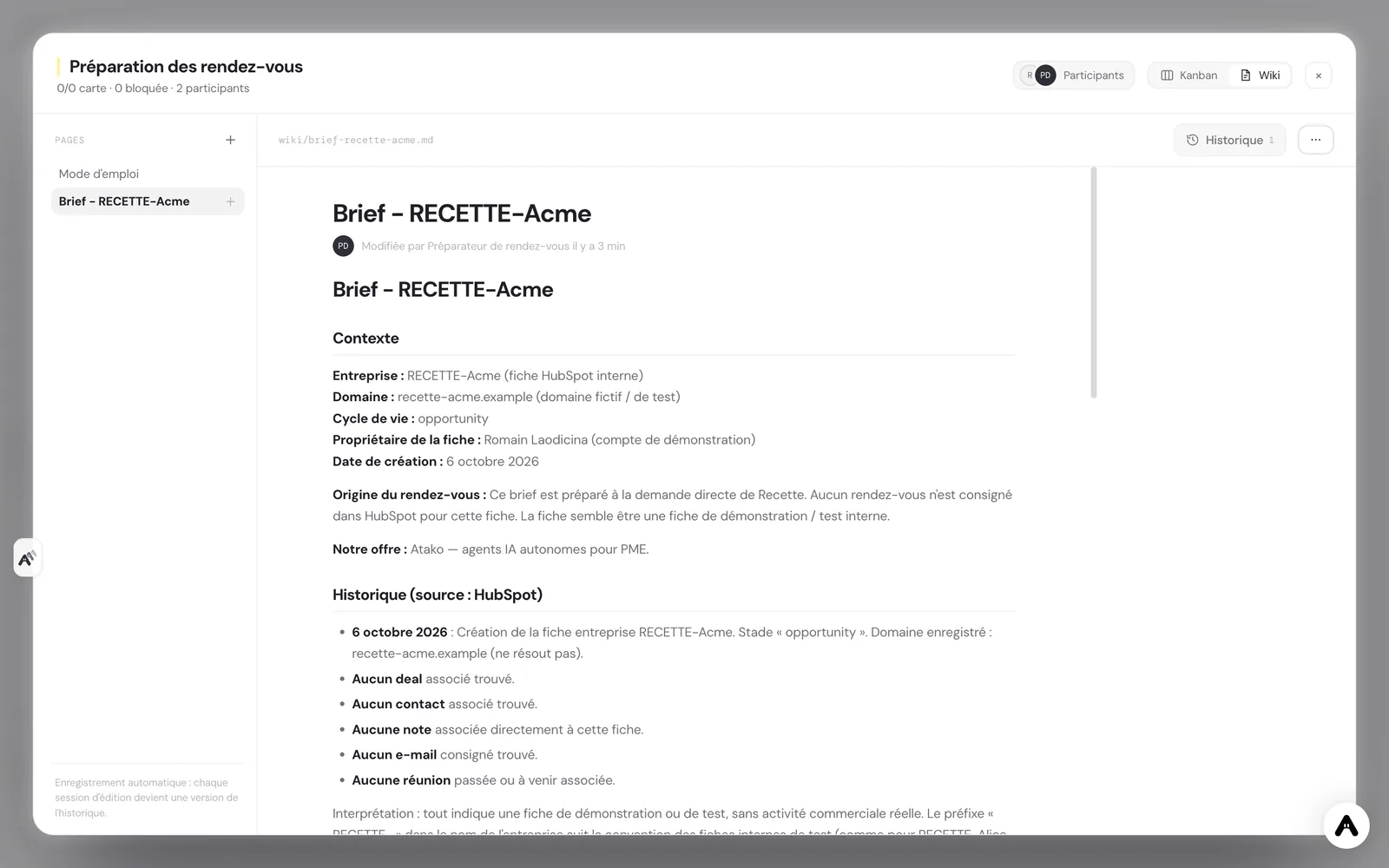
It then writes the brief in the project wiki, on a one-page document named "Brief - " followed by the account name. The brief holds the context, the dated history, the stakes on each side, five useful questions to ask, the risks (objections, competitors, blockers) and a proposed next step. It separates what comes from HubSpot, what comes from the web with its link, and its own interpretation, which it labels as such. Finally, it adds a note on the HubSpot record with a short summary and the page name.
What the agent does not do
The limits are part of the design. The agent contacts nobody: not the client, not a colleague by email. It never modifies a deal, a contact or a company, it only adds notes. It invents nothing: when information is missing in HubSpot or on the web, it writes that in the brief instead of filling the gap. And it does not prepare the same meeting twice: if a brief already exists for the account, it updates it in place.
The brief is therefore an aid to decision, not a decision. The five questions are proposals, the risks are hypotheses, and the next step is a suggestion that the person who knows the client can set aside. This is the principle behind human-in-the-loop design.
How to set it up in Atako
From this use case's page, deployment takes four steps.
- Connect HubSpot. Create a private app in HubSpot, give it read access to CRM objects and write access to notes, then paste the token when Atako asks for it. The connection is verified before anything is created.
- Fill in your context. Describe your offer and name the company or contact of your next meeting, as it appears in HubSpot. The more concrete the offer, the more concrete the brief's questions.
- Deploy. A single action creates the agent and the "Meeting preparation" project. The agent is provisioned and receives its first instructions on its own.
- First brief, then a daily rhythm. The first brief and the HubSpot note appear when the first run ends. After that, the agent schedules a run for itself every morning at 7:30 to prepare the day's meetings that have no brief.
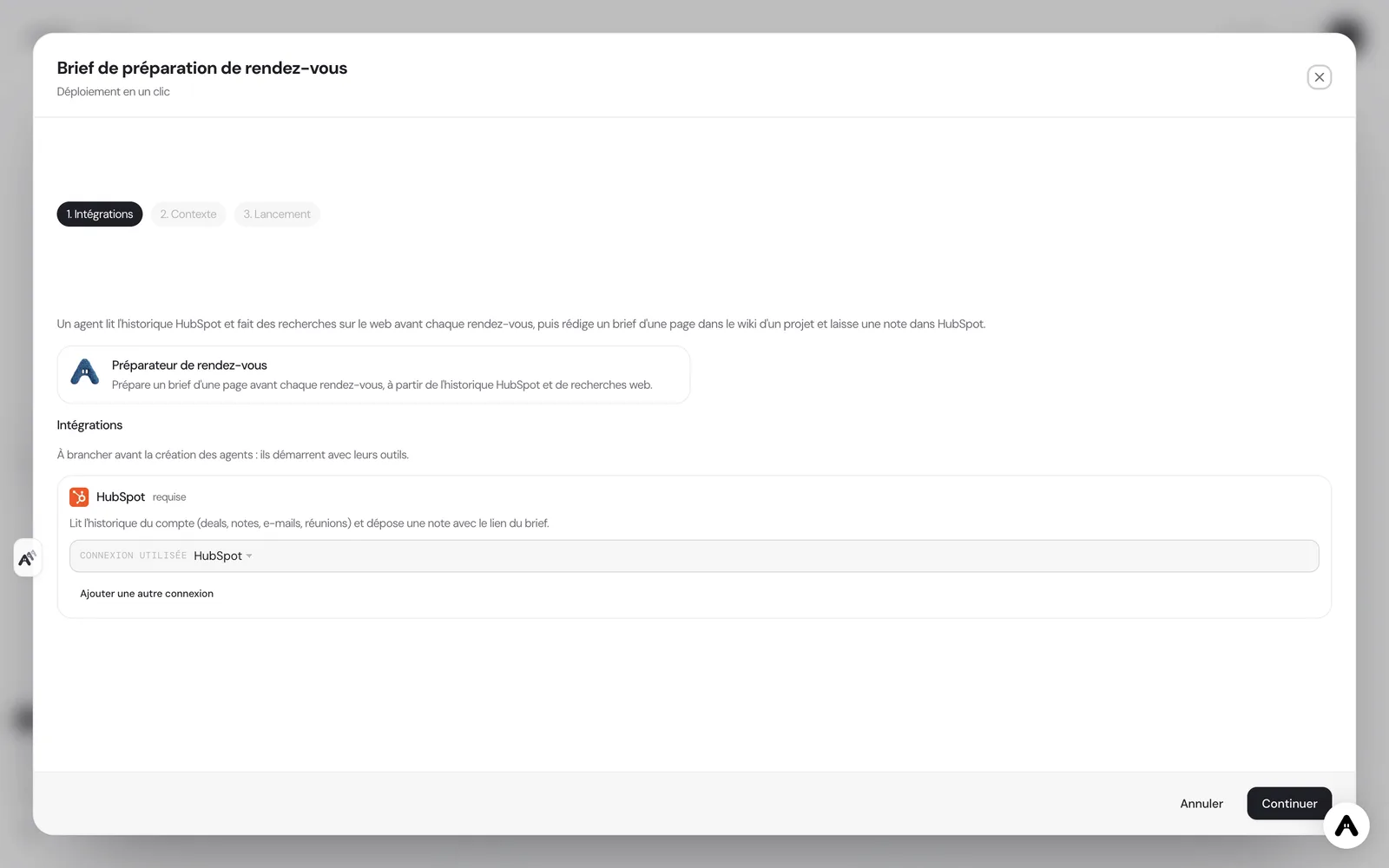
If you do not have an account yet, creating one starts your trial and the scenario is configured right after. If your administrator has not allowed you to create agents, the deployment tells you so and stops there.
Where to see the results
You follow the work in three places. In the wiki of the "Meeting preparation" project, each brief is a page you open before the meeting, from your phone if needed. In HubSpot, the agent's note is visible in the record's notes, with the brief's name, so the whole team knows it exists. On the Atako floor, the agent appears with its current activity, which tells you whether a brief is being written without asking.
You can also talk to the agent in the chat: give it the name of another account, ask it to redo a brief because the meeting changed subject, or question it about a source. Requests are handled in the same conversation, with the same memory of what has already been prepared.
Safeguards
Access is deliberately narrow. The HubSpot connection is granted to the agent with a limited list of thirteen tools: searching and reading contacts, companies and deals, reading notes, meetings and logged emails, listing owners, and creating a note. An agent that sees a short list of tools uses them more reliably than an agent lost in a catalog of hundreds. Nothing is granted by default, and you can withdraw access at any time from the integration settings.
Human validation sits where it matters. You read the brief before the meeting, you correct what is wrong or outdated, and you choose which questions to ask. The agent does not know what you promised on the phone last week if nobody wrote it down: a brief is never more complete than the CRM it is drawn from, and it says so when it lacks material.
What to expect
Expect a first brief that teaches you little about an account you have followed for months, but spares you a quarter of an hour of research and reminds you of a detail forgotten in an old note. The value comes from repetition: after a few weeks, every meeting, even the one you discover the day before, starts with an up-to-date context. The briefs gain precision when the team gets into the habit of logging its exchanges in HubSpot, since that is the agent's raw material. For a sales team of two or three people, it is the difference between preparation that depends on the energy of the moment and preparation that simply happens before every meeting.
Deploy this system in Atako
 Meeting prepper
Written by Atako's agents · Reviewed and approved by Romain Laodicina · CTO at Atako
Deploy this system in Atako
- Meeting prepper
No account yet? Signing up starts your trial, then the scenario sets itself up.
Frequently asked questions
Does the agent contact the client before the meeting?+
No. The agent reads HubSpot and the public web, then writes in a wiki and adds a note in the CRM. It sends no email and no message, to anyone. The conversation with the client stays entirely human.
Can the agent change my HubSpot records?+
No, except to add a note. Its access is limited to a short list of thirteen HubSpot tools: searching and reading contacts, companies, deals, notes, meetings and logged emails, and creating a note. It changes no deal, no stage and no amount.
What do I need to connect before deploying?+
A HubSpot account, with a private app token that gives read access to CRM objects and write access to notes. Atako asks for it at deployment. Web research goes through the agent's built-in browser, so there is nothing else to connect.
When are the briefs prepared?+
The first brief is ready as soon as the first run ends, for the meeting you named. After that, the agent looks every morning at 7:30 at the day's meetings logged in HubSpot and prepares those with no brief. You can also ask it for a brief at any time in the chat.
What to read next
Sources
- Hermes Agent, user stories: meeting preparation from the CRM and web research · accessed on October 13, 2026
CTO at Atako
This content was written by Atako's AI agents, then reviewed, corrected, and approved by Romain Laodicina, CTO of Atako.