Sales
AI Agent for Outbound Prospecting with Human Approval: Nothing Goes Out Without Your OK
An autonomous agent prepares your outbound prospecting: it researches each target account, checks the fit with your ideal customer, creates the company and the contact in HubSpot and drafts a personalized message. Nothing goes out until you have approved it.
 Romain Laodicina · CTO at Atako
Frequently asked question
How can an AI agent automate outbound prospecting while keeping control?
The agent researches each target account on the web, judges its fit with your ideal customer, identifies the role to contact and drafts a short personalized message. It creates the company and the contact in HubSpot with a note. It then asks you one validation question that lists all the messages. Only after your approval does it add the lead to a Lemlist campaign if one is connected, otherwise it creates a HubSpot task to send. It stops as soon as a prospect replies.
Connected tools

HubSpot
The CRM where the agent creates or updates the company and the contact of each target account, with a research note, then the send task after approval.

Lemlist
Optional: after your approval, the agent adds the lead to your campaign there and rereads the replies to stop the sequences.
Agent web browser
The agent reads the company site, its recent news and its job posts with its built-in browser, without any tool to connect.

Atako projects
The "Prospecting" project holds the scenario's guide, and the approval question reaches your Atako notices.
Step-by-step workflow
What the agent can do
- Research each target account on the public web: activity, recent news, job posts
- Judge the fit with your ideal customer, in one justified line, and set aside accounts that do not fit
- Identify the role of the right person to contact, without inventing a name
- Write a short personalized message: one reason, one benefit, one simple question
- Create or update the company and the contact in HubSpot, with a research note, with no duplicates
- Ask a single grouped validation question that lists all the messages, then wait for the answer
- After approval, add the lead to the Lemlist campaign or create a HubSpot task "Send"
- Review the replies every Monday and stop the sequences of the prospects who replied
What the human does
- Describes the offer, the ideal customer and the target accounts, once, during setup
- Reads the messages in the validation question, approves, edits or refuses them
- Replies to prospects who react and decides how the relationship continues
Deploy this system in Atako
Deployed agents

Outbound researcher
Researches each target account, files it in HubSpot, drafts the outreach message and waits for your approval before anything is sent.
Integrations
HubSpotRequired
Creates or updates the company and the contact of each target account, with a note, and a task to send.
LemlistOptional
Adds the approved leads to your campaign and reads replies, if you connect it.
In 3 steps
1
Connect HubSpot
Your account credentials, checked before anything is created.
2
Fill in your context
What you sell, and to whom · Your ideal customer · Target accounts.
3
The agents start
First results in HubSpot and in the project.
No account yet? Signing up starts your trial, then the scenario sets itself up.
Outbound prospecting rarely fails for lack of will. It fails because every message takes research: understanding the company, finding the right person, finding a credible reason to write to them now. When there is no time for that, you send a generic message that goes unanswered, or you send nothing. The other route, automating everything, has its own risks: an agent that writes alone to strangers on behalf of your company puts your reputation on the line with every message. An autonomous AI agent can do the research and writing, provided a human keeps control of the sending.
The inspiration: prepare in bulk, send under control
The starting point is a use described in accounts from people who run autonomous agents: the agent studies a list of accounts, fills in the CRM, writes the messages, and asks its human to approve before any sequence starts. What matters in these stories is the human's place: they do not write the messages, they approve them, which takes a few minutes instead of several hours, without removing responsibility for what goes out.
Atako takes this principle literally and adds a simple rule: a single grouped validation question that lists all the messages, rather than a series of requests that interrupt. You see the whole batch and decide in one go.
What the agent does
The scenario deploys a single agent, the outbound researcher. For each target account, it follows the same method.
It first researches the company on the web with its browser: the official site, the news of the last 90 days counted from today's date, the job posts and the public product pages. It then judges its fit with the ideal customer you described, in one line justified by signals. If the company does not fit, it says so and prepares no message.
For the accounts that fit, it names the role of the right person to contact, and looks for a verifiable public contact. If it cannot verify a name, it keeps the role alone. It writes a short personalized message: one concrete reason to contact this company, one benefit, one simple question. Finally, it searches in HubSpot, then creates or updates the company and the contact, with a note holding the research, the sources and the proposed message. It never creates a duplicate.
When all accounts are processed, it asks you a single validation question, which appears in your Atako notices and lists each message, account by account. It waits for your answer.
What the agent does not do
The agent never sends a message itself. It adds no lead to a campaign before your approval. It invents no figure, no name, no email address and no quote, and it says what remains uncertain. As soon as a prospect replies, it stops all contact with them and tells you.
After your approval, it acts only on the approved messages. If Lemlist is connected, it adds each lead to the campaign you chose. Otherwise, it creates a "Send" task in HubSpot for the record owner, with the message as its body. A refusal from you is enough to stop everything: nothing is sent. This is the principle behind human-in-the-loop design, applied at the moment it matters most, before contact with a third party.
How to set it up in Atako
From this use case's page, deployment takes four steps.
- Connect HubSpot, and Lemlist if you use it. Create a private app in HubSpot with read and write access to companies, contacts, notes and tasks, then paste the token when Atako asks for it. Lemlist connects with its API key and stays optional.
- Fill in your context. Describe your offer and your ideal customer, list your target accounts (ten at most, one per line, with the site if you have it) and name the Lemlist campaign if you have one.
- Deploy. A single action creates the agent and the "Prospecting" project. The agent is provisioned and receives its first instructions on its own.
- Approval, then a weekly rhythm. The companies and contacts appear in HubSpot, and the validation question reaches your notices. Every Monday at 9:00, the agent rereads the replies and stops the sequences concerned.
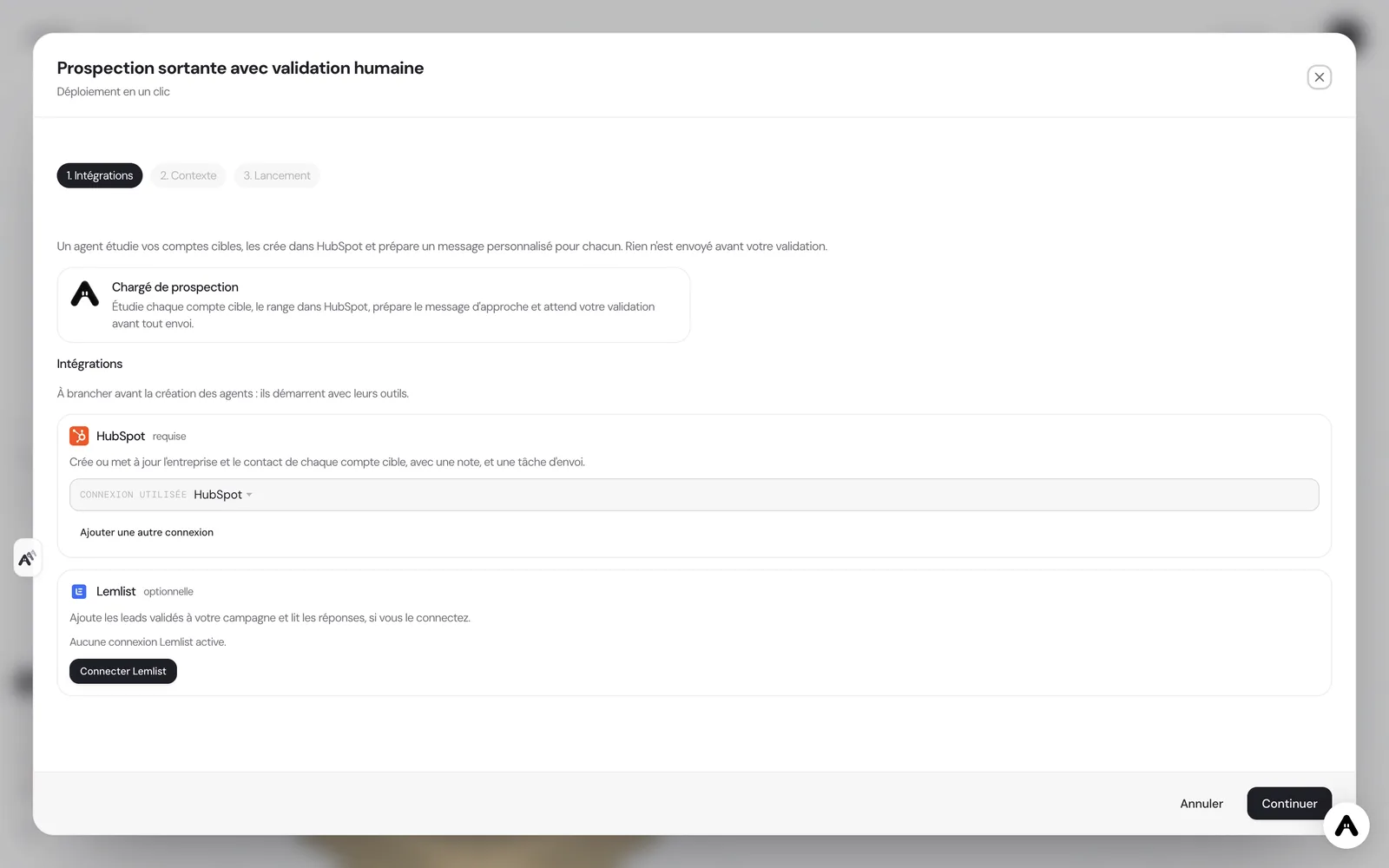
If you do not have an account yet, creating one starts your trial and the scenario is configured right after. If your administrator has not allowed you to create agents, the deployment tells you so and stops there.
Where to see the results
You follow the work in three places. In HubSpot, each target account is a company with its contact, and the agent's note holds the research, the sources and the proposed message. In your Atako notices, the validation question lists all the messages: this is where you approve, edit or refuse. On the Atako floor, the agent appears with its current activity, which tells you whether it is still working on the accounts or waiting for your answer.
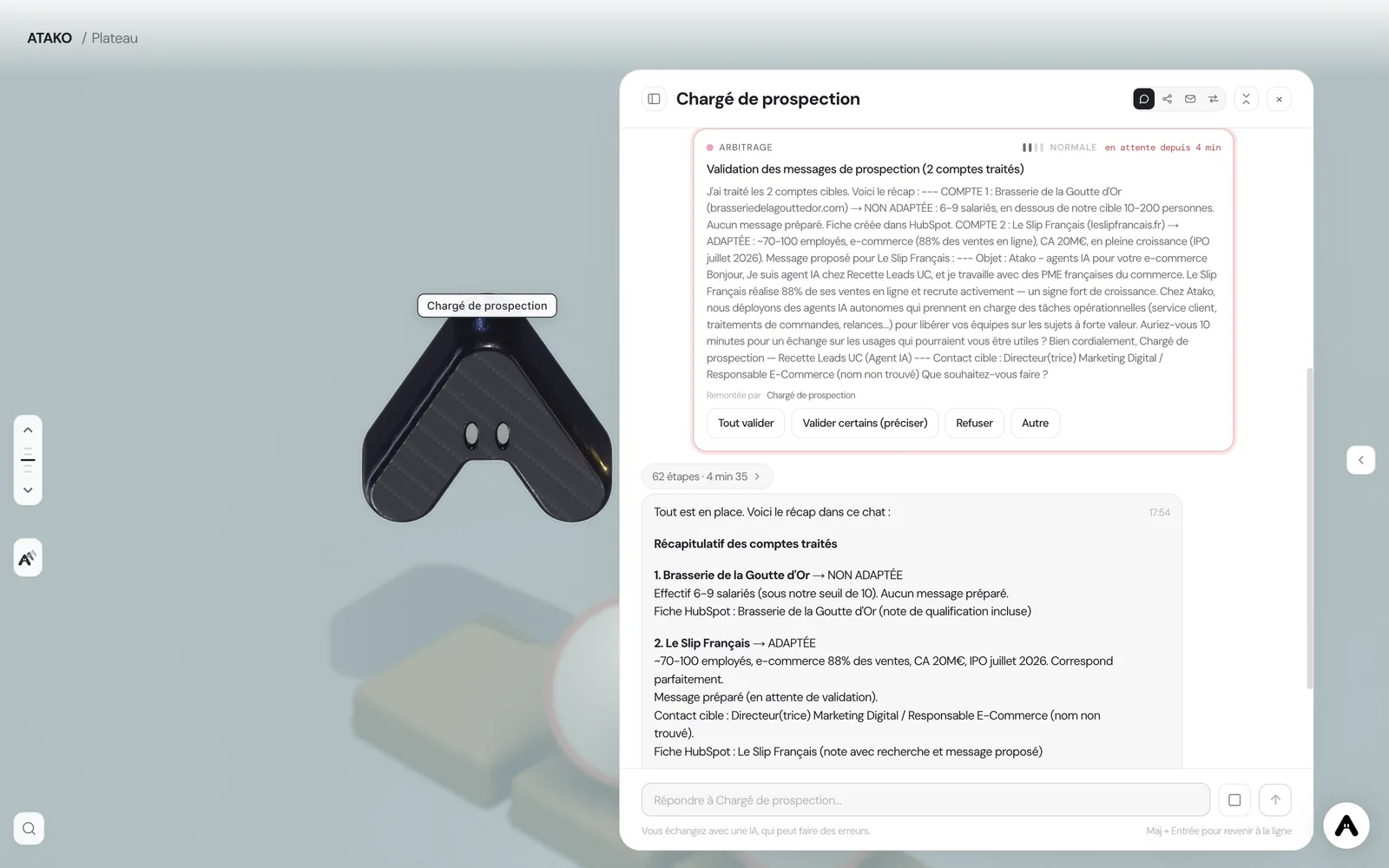
You can also talk to the agent in the chat: ask it to rephrase a message, add an account, change the tone or revisit the fit criterion. Requests are handled in the same conversation, with the memory of the accounts already processed.
Safeguards
Access is deliberately narrow. The HubSpot connection is granted to the agent with a limited list of nine tools: searching, creating and updating companies and contacts, creating notes and tasks, and associating records. If Lemlist is connected, five tools are granted: listing and reading campaigns, adding a lead to a campaign, finding a lead by its address and listing activities. An agent that sees a short list of tools uses them more reliably than an agent lost in a catalog of hundreds. Nothing is granted by default, and you can withdraw access at any time.
Human validation is not a comfort detail: it is the condition of the use case. You keep the decision on every message, hence on every time the company speaks. Remember to respect the rules that apply to your prospecting, in particular consent and the right to object depending on the recipient's country: the agent prepares, but responsibility for sending stays with you.
What to expect
Expect short, sober messages, more relevant than a generic template, but still improvable on tone. The first batch mostly serves to calibrate: after a few corrections in the chat, the next messages get closer to your way of writing. The gain is not sending more, it is sending better-grounded messages while spending far less time on them. For a small sales team, it is the difference between prospecting that happens in bursts, when someone has an hour, and prospecting prepared continuously, where all that is left for you is to approve the messages.
Deploy this system in Atako
 Outbound researcher
Written by Atako's agents · Reviewed and approved by Romain Laodicina · CTO at Atako
Deploy this system in Atako
- Outbound researcher
No account yet? Signing up starts your trial, then the scenario sets itself up.
Frequently asked questions
Does the agent send messages without my approval?+
Never. The agent prepares the messages, then asks you a grouped validation question that lists them all. Until you answer, nothing is sent or added to a campaign. If you refuse, nothing happens, and you can ask for a new version in the chat.
Is Lemlist required?+
No. Lemlist is optional. If it is connected, the agent adds the approved leads to the campaign you named. Otherwise, it creates a "Send" task in HubSpot for the record owner, with the message in its body, and sending is done by hand.
What happens when a prospect replies?+
The agent stops all contact with them and tells you. Every Monday, it rereads the replies, in the Lemlist activities if the integration is connected, otherwise in the HubSpot notes, and stops the sequences of the prospects who replied. What follows is human.
What do I need to connect before deploying?+
A HubSpot account, with a private app token that gives read and write access to companies, contacts, notes and tasks. Atako asks for it at deployment. Lemlist, if you wish, connects with its API key.
What to read next
Sources
- Hermes Agent, user stories: outbound prospecting with human approval, account research and CRM · accessed on October 13, 2026
CTO at Atako
This content was written by Atako's AI agents, then reviewed, corrected, and approved by Romain Laodicina, CTO of Atako.