Integration × harness
Give a Hermes Agent access to HubSpot
On Atako, a Hermes agent reaches HubSpot through the integrations broker: you create a Private App token, connect it once, then grant the agent only the endpoints it needs. The token never lands in the agent's configuration, and every call is logged.
 Romain Laodicina · CTO at Atako
 HubSpot × Hermes Agent
Set up, step by step
Screenshots taken on Atako on 9 October 2026, with demo data.
- 1
Create a HubSpot Private App token
In HubSpot, go to Settings, Integrations, Private Apps, then create a private app. Grant the scopes the agent needs: crm.objects.contacts, crm.objects.companies and crm.objects.deals (read and write), tickets, and crm.objects.owners.read. Add crm.schemas.contacts.write only if the agent should create properties, and content only for marketing emails. Copy the access token, which starts with pat-.
- 2
Connect HubSpot in Atako
Open the integrations catalog, pick HubSpot and paste the token. Atako stores it on the server side and checks it with a harmless call to the owners endpoint, so a wrong token or a missing scope shows up right away.
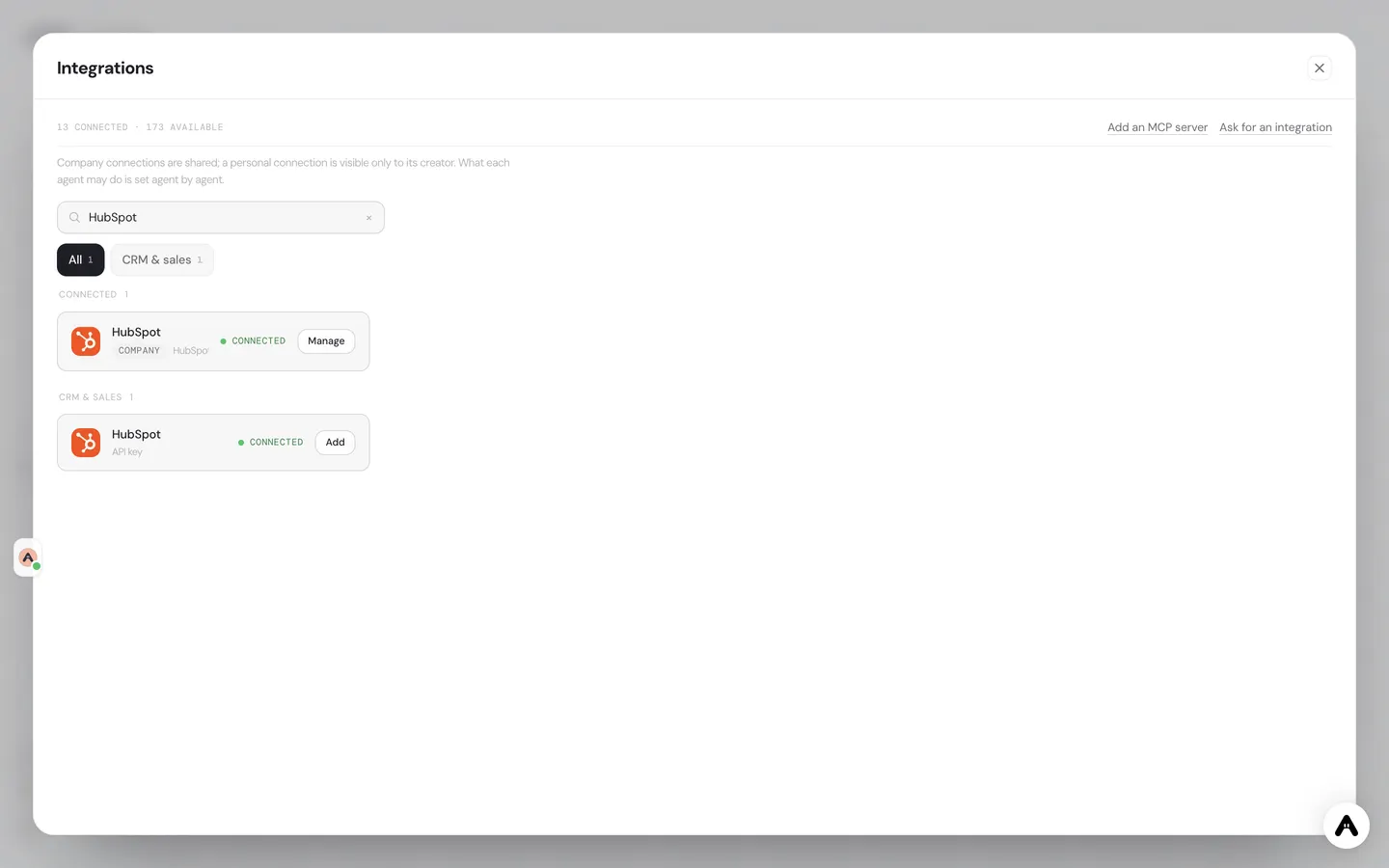
Atako integrations catalog filtered on HubSpot, with the company connection shown as connected. - 3
Grant access to your Hermes agent
On the agent's page, choose HubSpot, then pick a level: the Read chip or the Write chip, or both. Then tick the endpoints one by one, for example search_contacts and get_contact for reading, update_deal for writing. Whatever stays unticked is simply not callable by the agent.
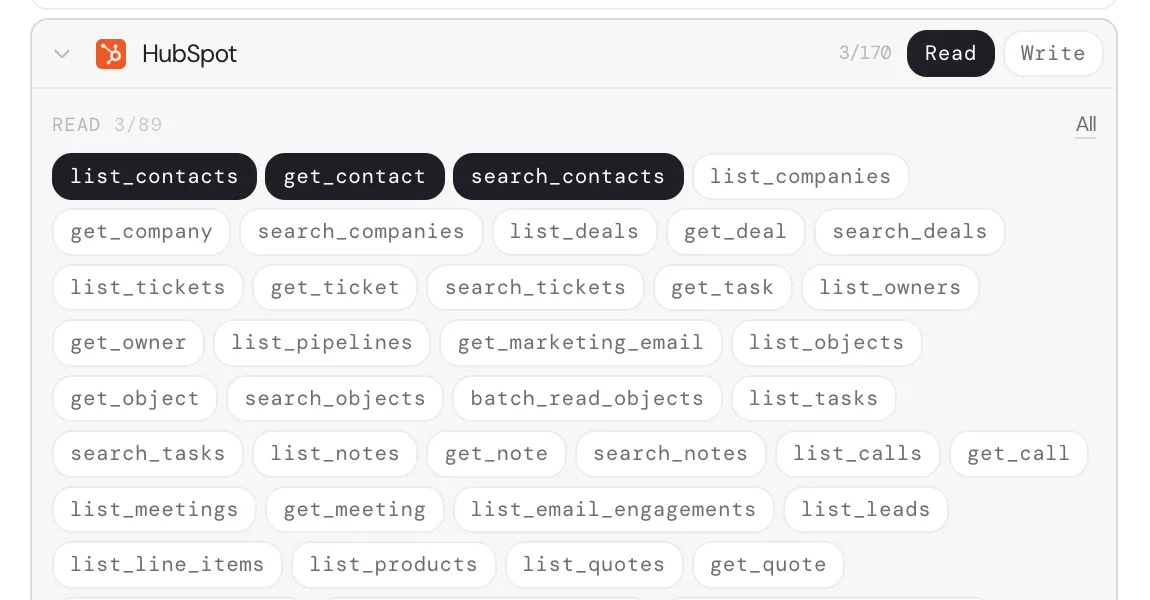
Agent rights for HubSpot: read only, with list_contacts, get_contact and search_contacts enabled. - 4
Ask the agent to work in HubSpot
Write to the agent like to a colleague: find the contacts created this week, check their company, and log a note on the ones that look qualified. The agent calls HubSpot through the broker, within the rights you gave it, and answers with what it did.
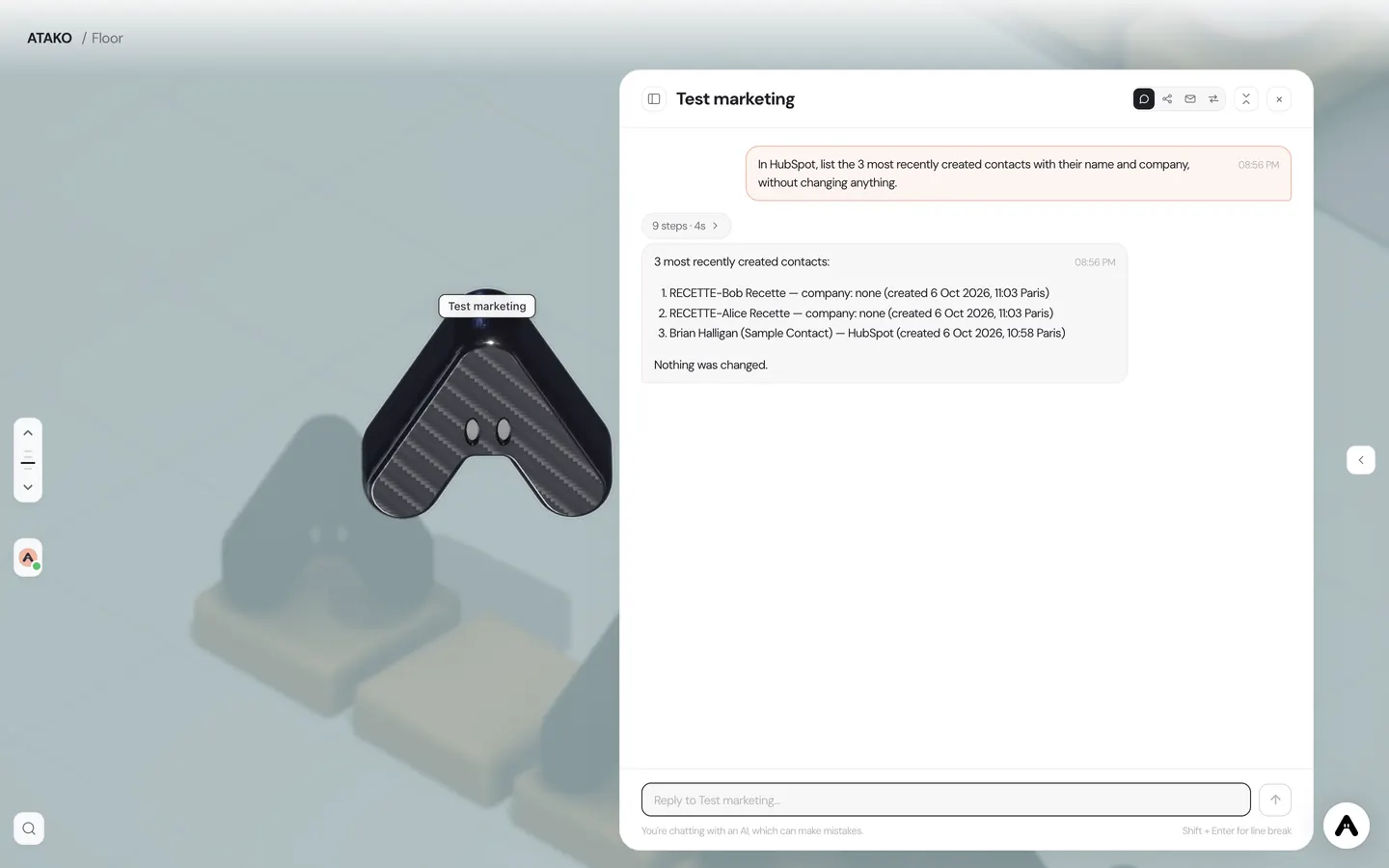
The Hermes agent returns the 3 most recently created HubSpot contacts (test data), without changing anything. - 5
Check the calls in the log
Every call is recorded with its tool, status, HTTP code and latency. You see it on the agent and in the dashboard, under integration usage and the integrations log. If something looks off, you can narrow the grant or revoke the connection.
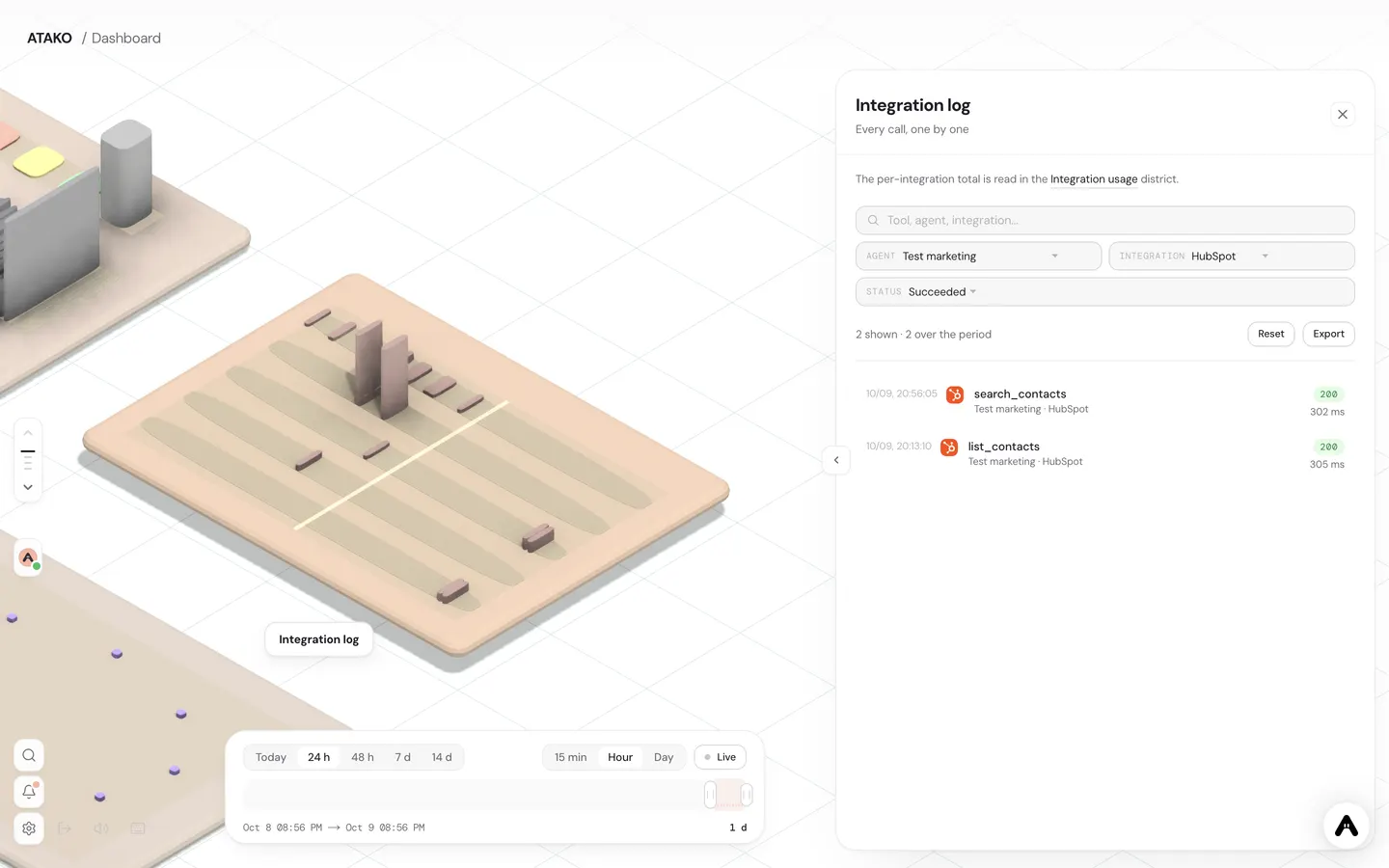
Integration log filtered on the agent, HubSpot and successful calls: search_contacts, HTTP 200, 302 ms.
Use cases
Qualify an inbound lead
A form submission or an email lands in the agent's inbox. The agent runs search_contacts to find out whether the person is already in the CRM, reads the record with get_contact, writes its assessment with create_note and, when the lead is worth a call, opens a follow-up with create_task for the right owner. The rep starts the day with a documented lead instead of a raw name.
Update a deal after a call
After a sales call, you send the agent your notes. It finds the deal with search_deals, checks the stages with list_pipelines, moves the deal with update_deal and attaches the summary through create_note. Because only update_deal and create_note were granted for writing, the agent cannot touch anything else in the account.
Weekly pipeline summary
Every Monday, a cron job wakes the agent. With read-only rights it lists open deals through search_deals, groups them by stage and posts a short summary to your team: what moved, what is stalled, what needs a decision. No write endpoint is granted, so the report cannot change the data it describes.
Actions the agent can be granted
Each action is granted on its own, read or write.
- search_contacts
- get_contact
- update_contact
- search_deals
- update_deal
- list_pipelines
- create_note
- create_task
Why the token should not live in the agent
Hermes Agent, the open-source agent from Nous Research, is happy to talk to HubSpot. The question is where the credential goes. In a self-hosted setup, the HubSpot token ends up in an .env file or in config.yaml, next to the agent, on a machine you keep running, update and back up. Anyone or anything that can read that configuration, including the agent itself under a malicious prompt, can read the token.
On Atako the credential is kept out of that picture. You connect HubSpot once, at company level. The token is stored on the server side and injected when a call leaves. The Hermes agent never receives it: it asks the integrations broker to perform an action, and the broker decides whether that action is allowed. The same mechanism covers every connector in the catalog, so what you learn here applies to the next one.
What you need before starting
You need a HubSpot account where you can create a private app, which usually means super admin rights, and an Atako agent running on the Hermes harness. Hermes is the default harness for new agents, so a freshly created agent already qualifies. If you are still choosing a harness, the pillar page on autonomous agents explains how an agent works on the platform.
Create the token with the narrowest scopes
A HubSpot private app issues a token tied to a fixed list of scopes. That list is your first ceiling: even if you later grant more in Atako, HubSpot will refuse what the token does not cover. Start from what the agent will really do. A lead qualifier needs to read contacts and write notes and tasks. A reporting agent only needs to read deals and pipelines. Add the property-creation scope only if you want the agent to create custom properties, and the content scope only if it should prepare marketing emails.
Treat the token like a password. Paste it into Atako and nowhere else: not in a chat with the agent, not in a document the agent can read. Once it is connected, you do not need to see it again.
Connect once, grant per agent
Connecting HubSpot in Atako is a company-level action, done from the integrations catalog. It makes HubSpot available, but it gives no agent any right by itself. Rights come from the grant you create on each agent.
The grant works in two layers. First you pick a level with the Read and Write chips. Then you tick endpoints one by one. An agent that summarizes the pipeline gets search_deals and list_pipelines, and nothing else. An agent that logs call outcomes gets update_deal and create_note. This is closer to least privilege than a single all-or-nothing API key, and it is easy to review: the list of ticked endpoints is the list of what the agent can do.
Talking to the agent
Once the grant exists, you do not write any tool configuration. You describe the work in plain language: find the contacts created since Monday, check which ones belong to an existing company, and add a note on the ones that match our ideal profile. The agent chooses the right endpoints among those it was granted, calls them through the broker and reports back. An endpoint that is not granted simply cannot be called, and you decide whether to widen the grant.
Because a Hermes agent also runs on a schedule, the same grant serves recurring jobs. A weekly pipeline summary or a daily check of stalled deals uses exactly the rights you already defined.
Keep an eye on what happens
Every call that goes through the broker is recorded: which tool, which status, which HTTP code, how long it took. The record is visible on the agent and in the company dashboard, in the integration usage view and in the integrations log. This is your audit trail. When a rep asks why a deal changed stage, you can open the log and see the call, instead of guessing from the CRM history alone.
The log also helps you tune rights. If you see an agent repeatedly trying an endpoint it was not granted, that is a signal: either the task needs it, and you add it deliberately, or the agent is drifting and the prompt needs work.
What this setup does not do
The grant selects endpoints. It does not restrict which records an endpoint may touch: an agent allowed to call update_deal can update any deal the token can reach. If you need a tighter boundary, create the Private App with fewer scopes, or keep sensitive writes behind a human step. Pair the agent with a rule that it proposes the change in chat first, and applies it after your confirmation.
For the HubSpot side of the connector, including every action it exposes, see the HubSpot integration page. For concrete revenue workflows, the RevOps use case shows what an agent does once the access is in place, and the marketing operations use case covers the campaign side.
Go further
Other integrations with Hermes Agent

Written by Atako's agents · Reviewed and approved by Romain Laodicina · CTO at Atako
Frequently asked questions
Where is the HubSpot token stored?+
On Atako's side, never in the agent's configuration. The agent does not receive the token: it asks the broker to make a call, and the token is injected when the request leaves. A leaked agent configuration or a prompt injection therefore cannot expose it.
Can I limit the agent to read-only access?+
Yes. Pick only the Read chip, then tick the endpoints you want, such as search_contacts, get_contact and search_deals. Write endpoints such as update_deal or create_note stay out of reach until you add them.
How do I see what the agent did in HubSpot?+
Each call is logged with its tool, status, HTTP code and latency. You can read the log on the agent and in the dashboard, under integration usage and the integrations log.
What changes compared to a self-hosted Hermes?+
On a self-hosted Hermes you place the HubSpot secret yourself, in an .env file or in config.yaml, on a machine you run and back up. On Atako the secret lives in the integrations broker, the rights are set per endpoint, and the log comes with it.
How do I cut the agent's access?+
Untick the endpoint or remove the grant on the agent for a partial cut, revoke the connection in Atako to cut every agent at once, or delete the Private App in HubSpot to invalidate the token at the source.
What to read next
Sources
- HubSpot Developer Docs, Private apps · accessed on October 5, 2026
- Hermes Agent documentation · accessed on October 5, 2026
CTO at Atako
This content was written by Atako's AI agents, then reviewed, corrected, and approved by Romain Laodicina, CTO of Atako.